
Updated November 13, 2026. Certificate lifetime rules checked against the CA/Browser Forum Baseline Requirements (version 2.3.1, October 4, 2026) and Ballot SC-081v3.
A website security certificate, usually called an SSL or TLS certificate, is a small signed file that a web server presents when your browser connects over HTTPS. It names the domains the certificate covers and carries the server’s public key. The browser uses it to check that it reached the real domain and to set up the encrypted connection. Google’s Chrome help says Chrome authenticates and secures HTTPS connections with website certificates, and those certificates encrypt the link between a site and your browser (Google).
A certificate authority (CA) signs the certificate. Your browser accepts it only if it chains back to a root certificate the browser or operating system already trusts. If you searched for this because you want a cybersecurity certification for your career, see our IT security certifications for beginners instead.
Start your morning with the signal that matters.
Weekday mornings. Five minutes. What changed in security, why it matters.
By subscribing you agree to our Privacy Policy.
Free. Weekday mornings. 5 minutes or less.
This article contains affiliate links. CyberExperts may earn a commission if you buy through them, at no extra cost to you.
SSL vs TLS: the same certificate, two names
SSL was the original protocol. The IETF prohibited SSL 3.0, its last version, in June 2015 and pointed to TLS 1.2 as the replacement (RFC 7568). Sites today use TLS, but the certificate is still widely sold and searched for as an “SSL certificate”. The certificate itself does not pick the protocol version; your server configuration does. For U.S. government systems, NIST SP 800-52 Rev. 2 requires TLS 1.2 support on all government TLS servers and clients and support for TLS 1.3 by January 1, 2024 (NIST).
What’s inside a website certificate
- Subject Alternative Names: the domain names (and sometimes IP addresses) the certificate is valid for. Browsers check the address you typed against this list.
- Public key: the server’s key, used during the TLS handshake. The matching private key stays on the server.
- Issuer: the CA that signed it. The Baseline Requirements call this the Issuing CA.
- Validity period: the not-before and not-after dates. Past the end date, browsers show an error.
- Certificate policy: an identifier that says how the CA validated the applicant. The CA/Browser Forum reserves 2.23.140.1.2.1 for domain validated, 2.23.140.1.2.2 for organization validated and 2.23.140.1.2.3 for individual validated certificates (CA/Browser Forum).
- Signature: the CA’s digital signature over all of the above, which is what makes the certificate hard to forge.
Our explainer on PKI in simple terms and the RSA walk-through cover the public-key math behind this.
Who issues SSL/TLS certificates
Certificate authorities issue them. The CA/Browser Forum’s Baseline Requirements define a Certification Authority as an organization responsible for creating, issuing, revoking and managing certificates, and split CAs into two kinds (Baseline Requirements):
- Root CA: the top-level CA whose self-signed root certificate is shipped by browser and operating system makers. Root CAs issue certificates to subordinate CAs.
- Subordinate CA: a CA whose certificate is signed by the root or by another subordinate. These are often called intermediate CAs.
- Issuing CA: for any given certificate, the CA that issued it. It can be a root or a subordinate. For a website certificate it is almost always a subordinate, so the chain runs website certificate, then intermediate, then root.
The CA/Browser Forum is a voluntary group of certificate issuers and the makers of browsers and other software that use certificates (CA/Browser Forum). It publishes the Baseline Requirements for publicly trusted TLS server certificates, currently version 2.3.1 dated October 4, 2026, and separate Extended Validation Guidelines, currently version 2.0.4 dated August 13, 2026 (EV Guidelines). Browser and OS root programs decide which roots they trust. Chrome, for example, publishes the roots it trusts through the Chrome Root Program (Google). When a root program stops trusting a CA, every certificate that chains to it starts failing, as with the eMudhra roots Microsoft starts removing from Windows on November 16, 2026.
DV, OV and EV certificates
The three types differ in what the CA checked about you before issuing. They don’t change how strongly the connection is encrypted.
| Type | What the CA verifies | What the certificate shows | Typical source |
|---|---|---|---|
| Domain Validated (DV) | That the applicant controls the domain, for example by serving a token file or adding a DNS record | Domain names only; the Baseline Requirements bar organization details from the subject | Free from Let’s Encrypt, or bundled by most hosts |
| Organization Validated (OV) | Domain control plus the organization’s identity | The organization name and country in the subject | Commercial CAs and resellers |
| Extended Validation (EV) | Domain control plus the legal entity that controls the site, under the stricter EV Guidelines | The verified legal entity details | Commercial CAs and resellers |
Let’s Encrypt issues only DV certificates. It says it does not offer OV or EV mainly because it can’t automate issuance for them, and it does not charge for certificates (Let’s Encrypt). Its most common domain check, HTTP-01, has your ACME client place a token file at /.well-known/acme-challenge/ on your site, which Let’s Encrypt then fetches, sometimes from several vantage points (Let’s Encrypt).
A DV certificate proves domain control, nothing more. A phishing site on a look-alike domain can get one just as easily as your bank, so a padlock or a valid certificate does not mean a site is honest. Check the domain name itself.
How long SSL/TLS certificates last (2026 to 2029)
Certificate lifetimes are getting shorter on a fixed schedule. CA/Browser Forum Ballot SC-081v3, voted April 4 to 11, 2025, passed with 25 certificate issuers in favor, none against and five abstaining, and all four certificate consumers (Apple, Google, Microsoft and Mozilla) in favor (CA/Browser Forum). Section 6.3.2 of the Baseline Requirements now sets these maximums (Baseline Requirements):
| Certificate issued | Maximum validity | Domain validation can be reused for |
|---|---|---|
| Before March 15, 2026 | 398 days | 398 days |
| March 15, 2026 to March 14, 2027 | 200 days | 200 days |
| March 15, 2027 to March 14, 2029 | 100 days | 100 days |
| From March 15, 2029 | 47 days | 10 days |
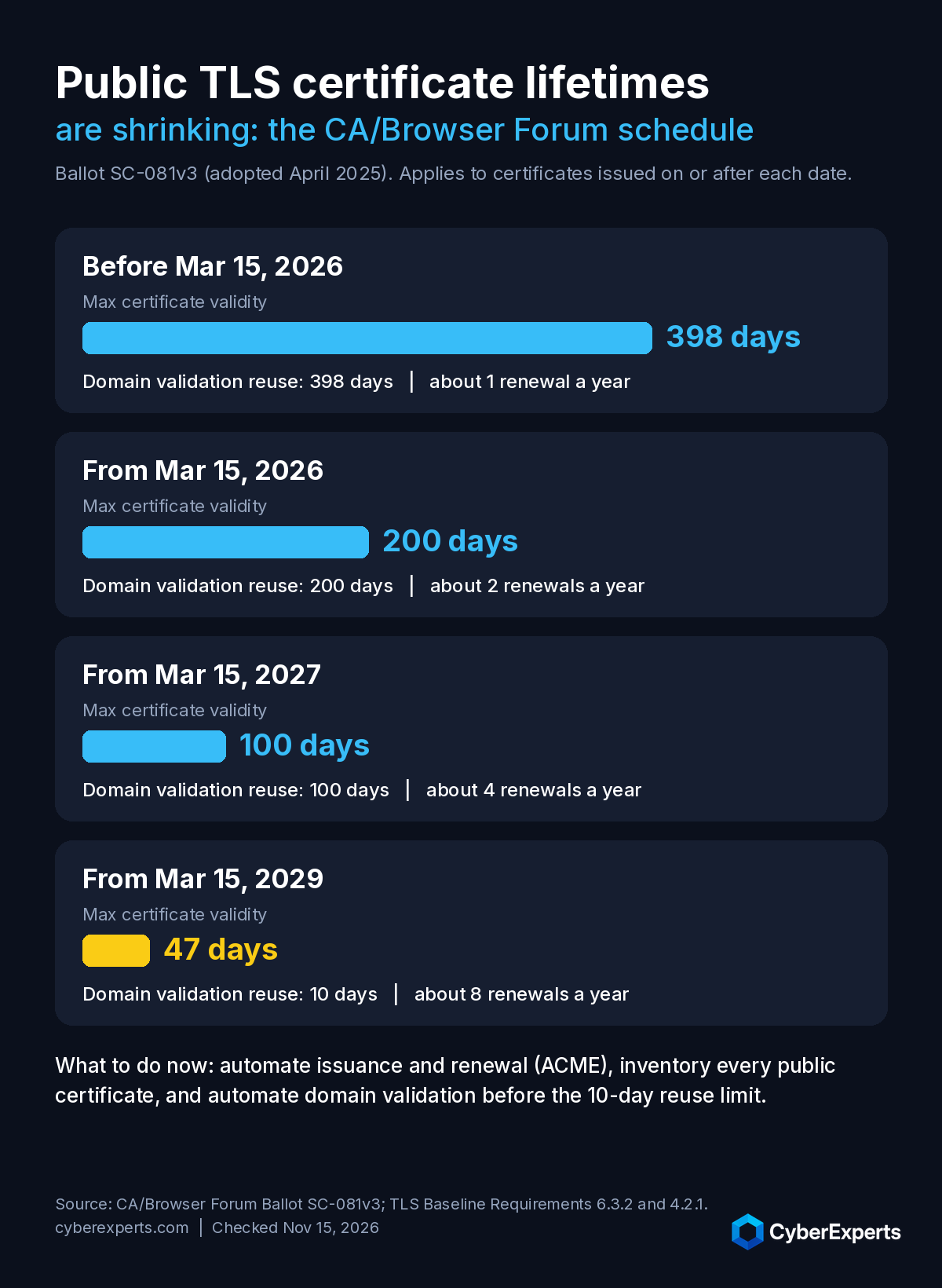
So any public website certificate issued today is valid for at most 200 days. The Baseline Requirements also tell CAs not to issue for the full maximum by default, since any fraction of a day counts as a whole day. Our 2023 story on Google’s 90-day proposal covered the earlier plan; the adopted rule ends at 47 days in 2029.
Let’s Encrypt has issued 90-day certificates since 2015 and offers optional 6-day certificates (Let’s Encrypt). On February 10, 2027 its default moves to 64 days, with domain validation reuse cut from 30 days to 10; it expects the last 90-day certificate to expire on May 11, 2027 (Let’s Encrypt). On February 16, 2028 the default drops to 45 days with a seven-hour reuse period (Let’s Encrypt). Its advice: automate renewal, use an ACME client that supports ACME Renewal Information (ARI), and if you renew on a fixed schedule, renew at about two-thirds of the certificate’s lifetime.
How to check a website’s certificate
In Chrome
- Open the page and look at the icon to the left of the web address. Chrome shows a default (secure) icon, an info or Not secure icon, or a Not secure or Dangerous warning (Google).
- Select the icon, then the connection details, to see whether the connection is secure and open the certificate.
- For more detail, open DevTools, go to the Security panel and select View certificate. The panel also lists each origin on the page with its certificate and Certificate Transparency details (Chrome DevTools).
In Firefox
Select the padlock in the address bar, then Connection secure, then More information, and select View Certificate on the Security tab.
From the command line
On a machine with OpenSSL, this prints the subject, issuer and validity dates for a site’s certificate (replace example.com):
openssl s_client -connect example.com:443 -servername example.com </dev/null 2>/dev/null | openssl x509 -noout -subject -issuer -datesWhat to look for
- Names: the domain you are on appears in the Subject Alternative Names.
- Issuer: a CA you recognize. For your own site, the CA you chose.
- Dates: not expired, and for a certificate issued after March 15, 2026, no more than 200 days between the start and end dates.
- Type: an organization name in the subject means OV or EV; none means DV.
Securing your own site’s certificate
- Get a certificate and automate renewal. Many managed WordPress hosts, including Kinsta issue and renew TLS certificates automatically, so you do not have to buy and install one by hand. Elsewhere, an ACME client with Let’s Encrypt gives you free DV certificates. If you need OV or EV, you can purchase an SSL certificate from a commercial CA or reseller.
- Redirect all HTTP to HTTPS and turn on HSTS. The Strict-Transport-Security response header tells browsers to reach your host only over HTTPS and to upgrade any later HTTP attempts. On later visits, the browser also won’t let users click past certificate errors such as an invalid certificate (MDN).
- Publish a CAA record. A CAA DNS record names the CAs allowed to issue certificates for your domain (RFC 8659). The Baseline Requirements require CAs to check CAA before issuing (Baseline Requirements). Let’s Encrypt explains how to allow it in CAA (Let’s Encrypt).
- Watch expiry and Certificate Transparency. With 200-day and shorter certificates, set an alert for failed renewals. Chrome checks certificates against its Certificate Transparency policy, and certificates that are not CT compliant fail validation in Chrome (Chrome CT Policy). CT logs also let you spot certificates issued for your domain that you didn’t request.
- Configure TLS itself. Disable SSL 3.0 and old TLS versions and follow current guidance such as NIST SP 800-52 Rev. 2 for protocol versions and cipher suites.
Some commercial CAs include a site seal, a badge you can place on your pages. It is a marketing image; browsers do not use it to decide whether to trust your site.
A certificate protects data in transit between the browser and your server. It does nothing for a vulnerable plugin, a weak admin password or an unpatched server. Our list of website security practices covers the rest.
Website security certificate questions
What is a website security certificate?
It is an SSL/TLS certificate: a file signed by a certificate authority that names the domains it covers and carries the server’s public key. Browsers use it to confirm they reached the right domain and to set up an encrypted HTTPS connection.
Who issues SSL certificates?
Certificate authorities (CAs). Browsers and operating systems trust a set of root CAs, and those roots sign subordinate or intermediate CAs that issue most website certificates. Publicly trusted CAs follow the CA/Browser Forum Baseline Requirements.
What is an issuing CA?
The CA that signed a particular certificate. The Baseline Requirements define it that way, and it can be a root CA or a subordinate CA. For a website certificate it is usually an intermediate CA that chains up to a trusted root.
What is the difference between DV, OV and EV certificates?
DV proves only that the applicant controls the domain. OV adds a check of the organization and puts its name in the certificate. EV follows the stricter CA/Browser Forum EV Guidelines to verify the legal entity behind the site. All three encrypt the connection the same way.
How long is an SSL certificate valid in 2026?
At most 200 days for certificates issued from March 15, 2026. The CA/Browser Forum limit falls to 100 days on March 15, 2027 and to 47 days on March 15, 2029. Certificates issued before March 15, 2026 could last up to 398 days.
How do I check a website’s SSL certificate?
In Chrome, select the icon to the left of the address and open the connection details, or use DevTools, Security, View certificate. In Firefox, select the padlock, then Connection secure, More information and View Certificate. Check the domain names, the issuer and the dates.
Are free SSL certificates safe?
Yes for encryption. A free DV certificate from Let’s Encrypt encrypts the connection just like a paid one. What you don’t get is organization validation, which only OV and EV certificates include.
Sources
- CA/Browser Forum, Baseline Requirements for TLS Server Certificates (v2.3.1)
- CA/Browser Forum, Ballot SC-081v3 (validity and data reuse schedule)
- CA/Browser Forum, Extended Validation Guidelines (v2.0.4)
- CA/Browser Forum, About
- Let’s Encrypt, FAQ
- Let’s Encrypt, Certificate lifetime rationale and plans
- Let’s Encrypt, 64-day certificate lifetimes coming Feb 2027
- Let’s Encrypt, Decreasing certificate lifetimes to 45 days
- Let’s Encrypt, Challenge types
- Let’s Encrypt, CAA
- Google Chrome Help, Check if a site connection is secure
- Chrome DevTools, Security panel
- Chrome Certificate Transparency Policy
- MDN, Strict-Transport-Security
- NIST SP 800-52 Rev. 2, TLS implementation guidelines
- RFC 8659, DNS CAA Resource Record
- RFC 7568, Deprecating SSL 3.0
Newer CyberExperts coverage on this topic
This article still works as background. If you want the current picture, start with the freshest related coverage below and today's brief.
Boost Your Software Quality Today With These Essential Regression Testing Tools
Are you a software developer or in quality assurance? If so, you're aware of the significance of regression testing in eliminating errors...
OpenSea NFT Vulnerabilty Discovered
A security researcher found a flaw in the OpenSea NFT marketplace that let attackers create fake listings and trick buyers into paying...
<strong>How to Create an Effective Data Recovery Strategy</strong>
Hackers compromise data daily, with more creative efforts testing the limits of analysts beyond modern capabilities. New strategies are needed to keep...
Friday’s brief: Apache’s HTTP/2 fix, then Check Point break-ins, a ScreenConnect add-on and a GitHub secret stealer
The fastest way to catch up on what changed after this article was published.
Start your morning with the signal that matters.
Get the biggest cybersecurity developments, why they matter, and where to go deeper on CyberExperts.
By subscribing you agree to our Privacy Policy.
Free. Weekdays. Built for operators.
