Tuesday, April 14, 2026
Home Blog Page 297
AI cybersecurity guidance for small businesses

Know where your business is exposed, what matters most, and what to fix first.

CyberExperts gives small businesses AI-generated cyber checkups, practical recommendations, and recurring cyber hygiene monitoring — without enterprise consulting complexity.

AI Cyber CheckupIdentify likely weak points and get a prioritized action plan.
Recurring MonitoringStay current with updated cyber hygiene guidance over time.
Built for SMBsPractical recommendations for real-world small business setups.

Most small businesses know cybersecurity matters. Very few know what to fix first.

CyberExperts turns cybersecurity confusion into a practical action plan. Instead of vague fear, generic checklists, or expensive consulting, you get AI-generated guidance focused on likely risks, weak spots, and the most important next steps.

How it works

1. Tell us about your businessShare your team size, tools, email setup, device practices, and current security habits.
2. CyberExperts analyzes your setupOur AI reviews likely weak points, common risks, and practical cyber hygiene gaps.
3. Get a prioritized action planReceive clear next steps in plain English — focused on what matters most.
4. Stay current with ongoing monitoringAdd recurring cyber hygiene monitoring if you want updated guidance over time.

Start with a checkup. Continue with monitoring.

AI Small Business Cyber Checkup

A one-time AI-generated assessment that identifies likely weaknesses, highlights the biggest issues, and gives you a practical action plan.

  • Likely weak points and avoidable risks
  • Top-priority recommendations
  • Plain-English next steps

AI Cyber Hygiene Monitor

A recurring cyber hygiene subscription that updates your recommendations, flags likely weak spots, and helps you stay current over time.

  • Recurring reassessment
  • Updated recommendations
  • Refreshed priorities over time

What CyberExperts does — and does not do

Done by AICyberExperts is built as an AI-delivered cybersecurity guidance product.
For small businessesDesigned for operators who want practical guidance without enterprise complexity.
Not a magic guaranteeIt helps identify likely risks and prioritize what to fix first.
Recurring option availableContinue with ongoing Cyber Hygiene Monitor updates over time.

See your biggest cybersecurity gaps in plain English.

Start with an AI Cyber Checkup and get a practical view of what to fix first.

12 Essential Password Change Policy Best Practices

Password change best practices are essential to securing sensitive data for both individuals and businesses. A robust password change policy is necessary to ensure sufficient defense against hackers, scammers, and security threats. Implementing best password protection practices is regarded to be an essential front-line defense. The rules protect critical information and IT infrastructures from unauthorized access to preserve integrity, availability, and confidentiality.

Whereas organizations have made long strides in other authentication methods, such as biometrics and certificate-based authentication, passwords remain among the most widely used techniques. At least 71% of users use password security to secure various accounts. However, there are numerous security challenges as malicious cyber actors innovate better ways of compromising password security. Password change policy best practices should be a top concern for all organizations. It is necessary to understand password security threats to appreciate the need for password change policy best practices.

Common threats to password security

Dictionary attacks: Hackers execute dictionary attacks using a software program that automatically inputs a list of common words in a pre-arranged listing. Cracking software creates a variation of common passwords to increase the success rate of compromising user passwords.

Hacking security questions: Many individuals use the names of relatives, spouses, children, pets, or attended schools as the answers to security questions. Hackers can guess such details when trying to crack a password through a reset process. A little research on social media can provide the information needed to break security questions.

Guessing simple passwords: Cybercriminals are aware most people use a sequence of letters or numbers to create a password. Examples are 123456, qwerty12345, 1qaz2wsx, among others. Using such passwords threatens the security of an entire organization.

Compromising accounts with the same password: Most people tend to reuse the same password across multiple accounts. A breach that compromises one account (See How Does Email get Hacked?) can enable a cyber adversary to access all other accounts using the same password. Reusing a password for social media accounts, banking, email, and work accounts may lead to additional security threats, such as identity theft.

Social engineering: Social engineering is among the oldest techniques used to compromise password security. Social engineering is a method where hackers manipulate their victims into performing actions, such as divulging protected information. The information includes a password used to secure confidential data and critical systems.

Recent password security statistics

  1. Over 300 billion passwords will be in the market by 2020

A recent report predicts that there will be more than 300 billion passwords by the end of 2020. The report attributes the staggering numbers to the growing use of password protection among artificial intelligence and humans. As a result, an average user could be managing approximately 60 to 90 different numbers. Companies and individuals should take such a large number as a warning that reusing passwords or creating weak passwords could result in increased cases of cyber vulnerabilities.

  1. Cyber-attacks are the fastest-growing crimes.

Cyber-attacks are among the fastest rising crimes globally in 2020. The rapid growth should be a massive concern for the private and public costs since the cyber-crimes result in skyrocketing costs. Since financially motivated attacks account for 71% of sensitive information leaks, while 25% are related to spying, cybercrime costs could exceed $5 trillion in the coming years. Such numbers are worrying since password reuse and creating weak passwords cause 81% of attacks and data breaches.

  1. Phishing and spam are among the most widely used methods for compromising password security.

In 2019, at least 76% of businesses were victims of phishing and other related social engineering attacks. Cybercriminals use fraudulent emails, links, and attachments to trick unsuspecting users into revealing confidential information like passwords and credit card details. Although many employees are aware of social engineering attacks, they still click on malicious emails, links, and attachments. The actions put a company’s systems and data at dire risk.

  1. Human errors account for most attacks.

Human mistakes are one of the most challenging issues to detect and prevent. Statistics show that human errors contribute to 52% of attacks and data breaches. Employees can make mistakes due to an inadequate understanding of cybersecurity literacy. Common mistakes made in password security include sharing unencrypted passwords over insecure networks, reusing passwords across different accounts, and creating weak passwords to protect confidential information. As the number of cyber-attacks increases in 2020, it is prudent for companies to give special consideration to the team and individual password security practices.

The 2019 State of Password and Authentication Security Behaviors Report compiled the following results obtained from a survey drawing 1,761 IT security practitioners:

  • 51% of users reuse passwords in personal and business accounts
  • 69% share their passwords with other colleagues
  • 67% of users do not use multi-factor authentication in their personal passwords, while 55% don’t apply the authentication scheme in their work passwords
  • 57% of users who have encountered a phishing attack did not change their password behaviors
  • 57% prefer using login methods that don’t involve password protection

Top Password Change Policy Best Practices

  1. Require Employees to Create a Long, Strong Passphrase

Creating strong passwords makes it harder for cybercriminals to crack them using brute-force, dictionary, and other types of password attacks. Strong passphrases must contain at least eight characters, consisting of lowercase, uppercase, symbols, numbers, and letters. The National Institute of Standards and Technology (NIST) advocates for creating long, easy to remember, and difficult to crack passphrases. According to the NIST Special Publication 800-63, a recommended password change policy best practice involves generating passwords with at least 64 characters maximum length. The characters should include spaces.

  1. Use Password Encryption

Using encryption technologies ensures passwords are protected. Organizational employees should use cryptographic methods to secure stored passwords and encrypt passwords shared over a network. Encryption ensures the passwords are inaccessible even if they fall into the hands of unauthorized individuals. The best password change practice to consider is implementing nonreversible, end-to-end encryption. The encryption ensures employees share passwords securely.

  1. Use Multi-Factor Authentication

Multi-factor authentication has become a crucial standard for measuring access privileges to protected resources. A multi-factor authentication scheme requires users to provide additional details to verify their legitimacy and authenticity. In addition to the usual credentials, such as passwords and correct usernames, users must confirm they are legitimate by providing additional items sent to a specified device. The items can be a code, biometric verification, or a personalized USB token. Multi-factor authentication prevents malicious individuals from using stolen password credentials to access protected data and systems. The idea is that by using multi-factor authentication, cracking or guessing passwords alone cannot enable attackers to gain unauthorized access.

  1. Test New Passwords

Most users create new passwords and leave it at that. While changing passwords is a health practice for maintaining password security, there is a probability of using an already compromised password without knowing. Since criminals use a list of known passwords when executing dictionary attacks, creating a compromised password exposes the protected resources to unauthorized access instances. As such, organizations should require their employees to test new passwords using online testing tools. The tools also determine if a password can be hacked easily. An example of such tools is the Microsoft password strength checker.

  1. Avoid Using Dictionary Passwords

Dictionary passwords are user credentials created using dictionary words. Currently, there are 171,476 usable words in a dictionary. Hackers develop sophisticated and powerful software programs capable of cracking passwords by inputting several words a second. The software programs also generate a variation of each word to increase the success rate. As such, software running a dictionary attack can end up trying millions of combinations until a hacker finds the correct password. Employees should avoid using dictionary words to create passwords. Instead, they should use various random characters, including alphabetical letters, special characters, and numbers, to create a long passphrase.

  1. Use Different Passwords for Each Account

Using different passwords is one of the most recommended password change best practices. Reusing a password in other accounts exposes them to the dangers of unauthorized access since a hacker will require to compromise the security of one account. In particular, employees should restrain from using a single password to secure their work accounts. A password manager is a suitable alternative to reusing passwords. Individuals can create a strong master password to secure all other passwords stored in a password manager tool. It requires users to remember the master password only to access the stored passwords.

  1. Change Passwords Only When There is a Potential Compromise or Threat

A long-standing password security practice forces employees or system users to change their passwords after some time. However, recent NIST password security guidelines advise against enforcing a password change policy, citing various reasons. The reasons include that forcing periodic password changes makes users repeat previous passwords to avoid remembering new ones. Reusing passwords is a security threat. Also, frequent password changes may cause employees to write down the new passwords if they forget them. However, written passwords may be accessed due to failing to adhere to a clean desk policy. Therefore, organizations should only request employees to change their passwords only when there is a potential threat or compromise.

  1. Change the Credentials for Accounts Not in Use

Companies must ensure to change the login credentials of accounts no longer in user. The employees assigned the accounts could be transferred to a different department or terminate their employment with the organization. Failing to change the password credentials of idle accounts exposes an account to various threats. For example, disgruntled employees could access the account and commit malicious actions on a company network or steal sensitive information due to revenge motivations. Also, insider threats could use inactive accounts to facilitate cybercrimes to cover their tracks. System admins must ensure all accounts that are not in use are disabled or have login credentials known to trusted individuals only.

  1. Enhance the Security of Privileged User Accounts

Passwords used to secure privileged accounts require special security considerations. Privileged accounts are user accounts that contain higher privileges compared to ordinary user accounts. For example, they can remove or install new software, modify an application, network, or system configurations, or upgrade an operating system. Privileged accounts have far-reaching consequences if unauthorized actors gain access. Therefore, the passwords used to secure privileged accounts need special protections. They include changing the password immediately after use and restricting access permissions to one or two trusted individuals. /

  1. Enforce a Password History

Although repeating or using passwords exposes critical systems to multiple threats, most companies have not implemented measures for curbing the vice. Enforcing a password history policy prevents a user from using a password used previously. A password history policy prevents users from reusing a specified number of previous passwords. For example, a company can create a policy where employees can not repeat twenty previous passwords. The policy protects against password hacking since it requires users to create new passwords each time they want to change old passwords.

  1. Create a Password Audit Policy

Password policies enable a company to keep track of all recent password changes. The policy allows system admins to monitor password changes in a user account. Password audits are essential since they facilitate the identification of suspicious password habits. For example, accounts where passwords are changed a few times every day, could mean malicious intent. Moreover, a password audit policy assists in identifying account users not adhering to password change best practices. Identifying such users enables an organization to implement more robust password policies to maintain high-security levels.

  1. Secure End Devices

End devices, such as smartphones, are used to reset account passwords or for multi-factor authentication. Failing to secure the end devices allows anyone with access to use them to hack or manipulate passwords. Individual users should ensure end devices have sufficient security to safeguard password protection. Strong passwords, or alternative methods like biometrics, should be used to secure end devices that can enable changes or modifications of passwords used to protect confidential accounts.
How Cybercriminals Plan Attacks (5 steps)

How cybercriminals plan attacks is a basic question that every cybersecurity expert needs to know. Cybercriminals use various tools and techniques to identify the vulnerabilities of their target victims. The target can either be an individual or an organization. Most cyber-attacks aim at stealing valuable information or breaching systems. Criminals plan active and passive attacks.

Active attacks actively aim to alter the targeted system. On the other hand, passive attacks only attempt to acquire as much information as possible about their target.

Active attacks may affect the integrity, authenticity, and availability of data, whereas passive attacks lead to breaches of privacy.

Cyber-attacks can also be classified as either outside attacks or inside attacks. An attack originating or executed from within the security perimeter of an organization is called an inside attack. In most cases, inside attacks are engineered and performed by employees who have access to the organization’s credentials and knowledge of the organization’s security infrastructure.

However, attacks executed from outside an organization’s or entity’s security firewall are referred to as an outside attack. This type of attack is performed by someone that does not have a direct association with the organization. The attack can be made over the internet or via a remote access connection.

In this article, I’ll walk you through many concepts so that you clearly understand how the mind of a cybercriminal works and the exact thought process of how they plan cyber-attacks. I will cover topics including types of hackers, attack techniques, types of cyber-crime, attack thought processes, how cyber criminals choose their target.  I will also explain other relevant areas that will give you an in-depth understanding of a cybercriminal’s mind frame or instead thought process.

Who are cybercriminals?

Most cyber-attacks are spearheaded by individuals or small groups of hackers. However, sizeable organized crime also exploits the internet. These criminals, branded as “professional” hackers, develop new and innovative ways to commit crimes. Others form global criminal conglomerates and treat cyber-crime like an income-generating investment.

Criminal communities operate as a unit, where they share strategies and tools to launch coordinated attacks, either from the same place or from different remote locations. The “business” has advanced over the past few years with the emergence of underworld cyber-markets, where you can conveniently purchase and sell stolen credentials and other information of significance.

The internet makes it very difficult to track down cybercriminals. It allows cybercriminals to collaborate anonymously. Attacks can be launched and controlled from any location across the globe. Hackers often use computers that have already been hacked, and any form of identity is removed.

This makes it extremely difficult to identify the attacker, tool, or gadget used to execute the attack.  Crime laws vary from country to country, making the situation very complicated when an attack is launched from a different country.

Types of Cyber Crime

1. Cyber-crime targeting an individual

In this type of attack, criminals exploit human weaknesses such as innocence, ignorance, and avidity. Attacks targeting an individual include copyright violation, sale of stolen or non-existent properties, financial frauds, harassment, etc.  The latest technological advancements and developments of new innovative attacking tools allow cyber criminals to expand the group of potential victims.

79% of security professionals think that the biggest threat to endpoint security is the negligence among the employees for security practices. We are all human, and we all make mistakes.  However, many people are scheming day and night to take advantage of a single silly mistake.  This mistake can cost you tremendous financial loss.

2. Cybercrime against an organization

Cyber-attacks against an organization are also referred to as cyber terrorism. Hackers rely on computers and the internet to perform cyber terrorism, steal confidential information or destroy valuable files, take total control of the network system, or damage programs. An example is a cyber-attack on financial institutions such as banks.

How Cybercriminals plan attacks

3. Cybercrimes target valuable assets

This kind of crime involves stealing property such as laptops, pen drives, DVDs, mobile devices, CDs, iPad, etc. In some cases, an attacker may infect the devices with a malicious program such as malware or Trojan to disrupt the functionality. One of the Trojans used to steal information from target victims is known as a Shortcut virus. The Shortcut virus is a form of a virus that converts your valid files into a form that cannot be accessed on your PC’s hard drive or Flash drive. The shortcut does not delete the actual file but instead hides it behind the shortcut files.

4. Attacks using a single event

From the victim’s point of view, this attack is performed with a single action. For example, an individual mistakenly opens an email containing corrupted files, which may either be malware or a link that redirects you to a corrupted website. An attacker then uses the malware as a backdoor to access your system and take over the control of the entire system if need be. This type of attack can also be used to cause organization-wide havoc, and it all starts with a single click by an “ignorant” employee.

5. Cyber-attacks considering a chain of events

In some situations, hackers perform a series of events to track a victim and interact with them personally. For example, an attacker may make a phone call or chat room to establish a connection with the victim and afterward steal or explore valuable data by breaching the relationship between the two parties. Nowadays, this type of attack is prevalent. Therefore, you should be extremely cautious before accepting a friend request on Facebook or joining a WhatsApp group using links from unknown sources or WhatsApp groups.

How Cybercriminals Plan Attacks

Below are the three phases involved in planning a cyber-attack.

  1. Reconnaissance – this is the information gathering stage and is usually considered a passive attack.
  2. Scanning and scrutinization of the collected data for validation and accurate identification of existing vulnerabilities.
  3. Launching the attack – entails gaining and maintaining access to the system.

1. Reconnaissance

The first step in how cybercriminals plan attacks is always Reconnaissance.  The literal meaning of reconnaissance is an act of exploring with an aim or goal of finding someone or something about the target. Concerning cybersecurity, it’s an exploration to gain information about an enemy or a potential enemy. In cybersecurity, reconnaissance begins with “Footprinting”, the initial preparation towards the preattack phase, and entails collecting data about the target’s computer infrastructure as well as their cyber-environment.

Footprinting gives an overview of the victim’s weak points and suggestions on how they can be exploited. The primary objective of this phase is to provide the attacker with an understanding of the victim’s system infrastructure, the networking ports and services, and any other aspect of security required for launching attacks.

Thus, an attacker attempts to source data from two different phases: passive and active attacks.

2. Passive attacks

This is the second phase of the attack plan. In this phase, an attacker secretly gathers information about their target; the aim is to acquire the relevant data without the victim noticing. The process can be as simple as watching an organization to see when their CEO reports to work or spying on a specific department to see when they down their tools. Because most hackers prefer executing their duties remotely, most passive attacks are conducted over the internet by googling. For example, one may use search engines such as dogpile to search for information about an individual or organization.

  1. Yahoo or Google search: malicious individuals can use these search engines to gather information about employees of the firm they are targeting to breach their system.
  2. Surfing online communities like Twitter, Facebook, Instagram can also prove useful sources to gather information about an individual, their lifestyle, and probably a hint to their weakness that can then be exploited.
  3. The organization’s website may also provide useful information about specific or key individuals within the organization, such as the CEO, MD, head of the IT department, etc. The website can be used to source personal details such as email addresses, phone numbers, roles, etc. With the details, an attacker can then launch a social engineering attack to breach their target.
  4. Press releases, blogs, newsgroups, and so on, are in some cases, used as the primary channels to gather information about an entity or employees.
  5. Going through job requirements for a specific position within a company can also help an attacker identify the type of technology being used by a company and the level of competency of their workforce. An attacker can then decide on what method to use when breaching the targeted system from the data.

3. Active Attacks

An active attack involves closely examining the network to discover individual hosts and verify the validity of the gathered information, such as the type of operating system in use, IP address of the given gadget, and available services on the network, collected during the passive attack. It involves the risk of detection and can also be referred to as “Active reconnaissance” or “Rattling the doorknobs”.

Active reconnaissance can be used to confirm the security measures put in place by an attacker, but at the same time, it can alert the victim if not well executed. The process may raise suspicion or increase the attacker’s chance of being caught before they execute the full attack.

4. Scrutinizing and Scanning the Gathered Information

Scanning is a key step to intelligently examine after as you collect information about the network infrastructure. The process has the following objectives;

  1. Network scanning is executed to understand better the IP address and other related information about the computer network system.
  2. Port Scanning – to identify any closed or open ports and services
  3. Vulnerability scanning – to identify existing weak links within the system.

In the hacking world, the scrutinizing phase is also referred to as enumeration. The objective of scrutinizing includes:

  1. To validate the authenticity of the user running the given account, be it an individual or a group of persons.
  2. To identify network resources and or shared resources
  3. To verify the operating system and various applications that are running on the computer OS.

5. Attack

The attack phase is the last step in the attack process. It involves the hacker gaining and maintaining full control of the system access. It comes immediately after scanning and enumeration, and it launched sequentially as listed in the below steps.

  1. Brute force attack or any other relevant method to bypass the password.
  2. Exploit the password.
  3. Launch the malicious command or applications.
  4. If requires, then hide the files.
  5. Cover the tracks, don’t leave any trail that can lead back to you as the malicious third party. This can be achieved by deleting logs so that there is no trail for your illicit actions.

The Deep Web

The deep web is the core of online underground cybercrime activities. It is inaccessible with the standard browsers and can also not be indexed by the available search engines. It entails the dark web as the most significant component. Other components include TOR, Invisible Internet Project, and Freenet.

The deep web can only be accessed by very sophisticated technologies as most owners of the site prefer to remain unknown. The contents of these websites are hidden from the general public and can only be accessed by those with A-level computing skills. The Onion Router (Tor) is used to access the Deep Web, as the browsers allow one to surf anonymously and hide your IP address with a different one.

The Deep Web is a paradise for cybercriminals. Underworld criminals can freely trade in illegal drugs, buy and sell malware, crimeware, ransomware, identity cards, deal with cyber-laundering, credit cards, and the list goes on and on.

Conclusion

Cybercrime is a complicated and vast phenomenon. The rapid increase in phones, Wi-Fi networks, and the internet has increased the complexity and cyber-attacks. The advancement in technology has led to an expansion in cyber-criminality and the cyber victimization of the vast ignorant population.

Protection against cybercriminal activities starts with taking individual precautionary measures. It then expands to organizational, corporate, military, societal, national, and international levels. Comprehensive protection at all levels and the installation of various layers of security minimizes, prevents, and decelerates the rate of cybercrime.

Most hackers use the commonly available tools to exploit the less knowledgeable population. Installing the right technology at your organization or personal level alone is not enough to efficiently protect against cybercrime.

Integration of fields such as awareness, employee training, culture, social aspects, laws, International corporations, and prosecutions are needed to blend with technical solutions to tackle cybercrime.  Of course, it is essential to understand how cybercriminals plan attacks.

The creation of national governance and International entities formed by various countries to prosecute cybercriminals are areas to be improved. Cybersecurity is a global responsibility and should be jointly handled by major countries across the globe, if not all. Train your employees. Please give them the right technology, and always be woke to avoid the fatal damages caused by cybercriminal activities.

Multi Factor Authentication (MFA)

More and more companies and private individuals have been looking for better ways to keep their data secure in recent years. No one is truly safe, with huge companies like Facebook, Ticketfly, and T-Mobile suffering from devastating data breaches in 2018. With data breaches happening so frequently, many individuals are understandably worried about exposing their data and suffering from financial loss and must turn to multi factor authentication.

Key cybersecurity measures like enabling a firewall, installing antivirus software, and using encryption technology can only do so much against cybercriminals. Hackers have been using more sophisticated software to steal corporate and private data, so you should do everything you can to keep your data secure. One way of doing this is by enabling multi-factor authentication (MFA) as an extra security measure.

In this post, we’ll be looking at everything you need to know about MFA.

How MFA Improves the Security of Your Accounts

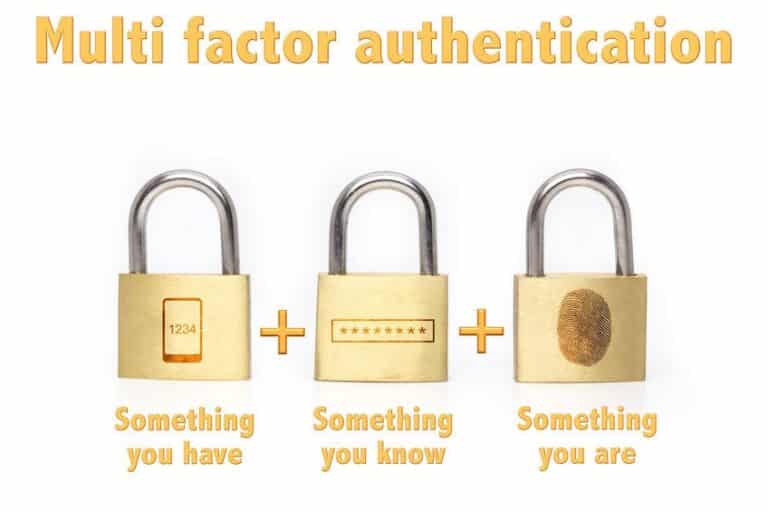
In a nutshell, MFA is a security system that necessitates more than one way of authenticating a user. Usually, it combines two or more types of authentication credentials: something a user knows, something they physically have, and something they are.

The MFA creates an extra layer of security to make it harder for hackers or an unauthorized person to access your account. Since there is more than one way of accessing an account, any hacker who’s able to get through the first tier of security (like cracking your password) will be stopped in their tracks as they won’t have access to the other security factors you’ve enabled.

The Different Types of MFA

Below we’ve detailed the different types of MFA you can enable to keep your data secure.

Possession Factors

This pertains to physical items that a user possesses to authenticate their login process. These could be a key fob, smartphones, USB drives, security tokens, or the phone’s SIM Card. For example, you might receive a notification on your phone asking if you’re authenticating the login of one of your accounts on a new device. One-time passwords (OTPs) also fall in this category since this is usually sent to your email or phone number.

Knowledge Factors

What falls in this authentication factor category are passwords, PINs, or answers to secret questions. Whatever a user can recall and remember is considered a knowledge factor. This is usually the first level of security you’ll encounter when you try accessing your account.

Inherence Factors

To put it simply, anything that falls under this category is a part of a user’s body that can be used for authentication purposes. ‘Are Selfies the Next Best Security Tool?’ by HP highlights how companies have begun using facial recognition to improve the security of their products and services. For instance, numerous phone manufacturers like Apple and Huawei have installed facial recognition systems to map out a unique detailed depth map of your face ⁠— serving as a biological trait that can be used to confirm a login. Others that fit in this category are iris scans, voice verification, and palm scans.

Is MFA Perfect?

As with all security methods, nothing is 100% prone to vulnerabilities. In ‘The Security Downside of SMS-based Multi Factor Authentication (MFA)’ by George Mutune, he mentioned the security flaws of popular methods like SMS-based MFA. SIM swap attacks to SS7 network vulnerabilities, SMS-based MFA is far from being the perfect MFA method.

A Medium article by Stuart Schechter also illustrates the risks of enabling MFA. For one, you can permanently lose access to your account if you fail to answer a question on your chosen secondary MFA method. Another risk of enabling MFA is that it can make you careless since you now have the notion that your accounts are 100% secure. This can make you vulnerable to trusting unknown publishers and phishing scams.

Regardless, it’s still recommended to enable MFA on all your accounts ⁠— be sure to be on the lookout for security vulnerabilities that may compromise your data. If you want to learn more tips on how to practice cybersecurity, head on over to our article ‘Top 20 Cybersecurity Practices that Employees Need to Adopt’.

What do Virtually all Phishing Emails have in Common? (5 Things)

What do virtually all Phishing Emails have in common?  By understanding what Phishing Emails have in common, you can quickly identify them and avoid these threats.

What is phishing?

Phishing is a method used by hackers to collect personal information using deceptive e-mails and websites. It’s a form of attack that uses disguised email as a weapon.

The main objective is to trick the target into believing that the message is legitimate. It could be crafted to look like a note from a senior employee within their firm. Sometimes they are made to look like a request from their bank. It may direct the victim to download an attachment or to click to link.

However, phishing emails are distinct and can be easily identified by someone who is well informed about the characteristics of this kind of cyber-attack.

In most cases, phishing emails appear to be from a real person, a trusted entity, or a company with which the target is likely to do business.

Phishing attacks are one of the oldest techniques used in cyberattacks, dating back to the 1990s. Despite being in existence for quite some time, phishing attacks are becoming more sophisticated and sinister with a rapid technological development rate.

Phishing is still one of the most widespread and most exploited techniques by black-hats, especially during crises such as SARS or COVID-19.

In this article, we will address some of the striking similarities between various phishing emails. We will look at multiple types of phishing attacks. We will describe vulnerabilities mostly exploited and show how to position your company or yourself against such security incidences.

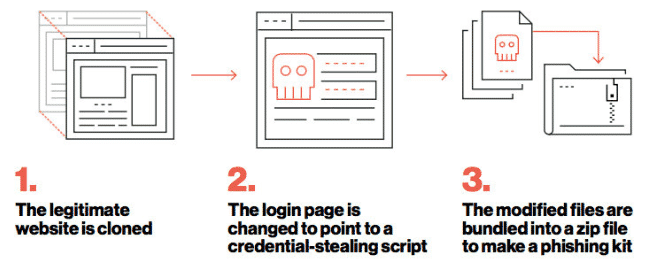
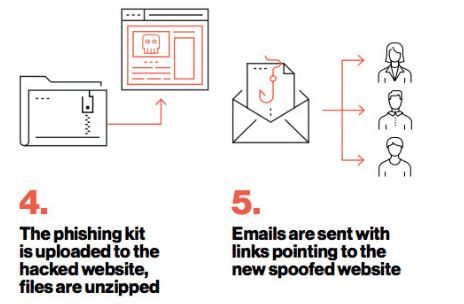
Phishing Kit

A phishing kit is a collection of software tools that makes it easier for people with little or no technical skills to execute an attack. A typical phishing kit is made of website development software with a simple, low/no-code graphical user interface (GUI).

The phishing kit comes complete with graphics, sample scripts, and email templates that an attacker can readily use to create legitimate correspondences. Some phishing kits come along with telephone numbers, a list of vulnerable e-mail addresses, and various software to automate the malware distribution process. Phishing-kit

phishing-kit-2

Types of phishing

One thing that all phishing emails have in common is the disguise. Attackers cover their email address so that it looks like it’s coming from a legitimate user. Or, they create fake websites that look like legitimate ones trusted by the target. In some cases, they use foreign character sets to disguise URLs.

With that in mind, we can classify various forms of attack as phishing attacks. Classification can be done in several ways, including the purpose of the phishing attempt, intrusion technique, etc. Generally, phishing emails aims at two things:

  • Trick the victim into handing over sensitive information, often a username and a password, that the attacker can easily breach a system or account.
  • Download malware. In this case, an attacker aims at deceiving the target to infect their computer by installing malware or a local access Trojan to infect their computers. For instance, a phishing mail may be sent to an HR officer with an attachment that claims to be a job seekers’ resume. The attachments are mostly in .zip files or Microsoft Office documents embedded with malicious codes or links.

1. Email Phishing

Most phishing attacks are sent via email. In these techniques, the hacker sets up a fake domain that mimics a genuine organization and then sends lots of generic requests to an identified target through the mail. The fraudulent substitution always involves replacing characters, such as ‘n’ and ‘r’ (‘rn’)close to each other to appear as ‘m’. In some cases, the crooks may decide to use the organization’s name in the domain, such as al*****@*****ok.com, hoping that it will appear as ALIBABA in the target’s inbox.

There are several ways to spot a phishing email, and by the end of this article, you should be able to spot one quickly.  You will also be able to guide others to identify Phishing emails.

As a general rule, always check and carefully scrutinize the email address of a message asking you to click a link or download an attachment. It is also wise to run an email lookup on unknown emails so that you can stay safe from potential phishing scams.

2. Whaling

Whaling attacks target senior executives. Despite having the same goal as any other form of a phishing attack, whaling attacks tend to be more subtle.

Because the technique is used on high-profile individuals within an organization, the methodology does not employ fake links and malicious URLs in breaching a system.

There have been increasing cases of whaling attacks on various sectors involving bogus tax returns in the recent past. Tax forms are valuable to hackers. They contain a wealth of important information such as social security numbers, addresses, bank account information, and the targeted individual’s official full names.

3. Vishing and Smishing

When using either vishing or smishing techniques to hack a target, telephones replace emails as the primary communication method.

In smishing attacks, a cybercriminal sends phishing texts to a target through text messages using a telephone. The message is drafted and tuned just as the email could have been. The objective is to convince the victim that the message is from a legitimate or trusted source.

In Vishing attacks, the cyber-criminal deceives its target through an actual phone call.

One of the common tricks used by hackers to execute a vishing attack is posing as a fraud investigator. The attacker may pose to be from a card company or a bank and pretend to inform the target about accounts that were breached.

4. Spear Phishing

Spear phishing is a sophisticated method of attack involving email. This technique is used to breach a specific person. Cyber-criminals who exploit their targets through these techniques already have some information about their targets, such as;

  • Name and physical address
  • Place of employments
  • Title of job
  • Specific information about duty at work
  • Email address

One of the most detrimental phishing attacks ever done, the hacking of the Democratic National Committee, was accomplished with the aid of spear phishing. The first round of attacks involved sending emails containing malicious attacks to more than 1 000 email addresses. The second wave of the attack led to a better part of the committee members sharing their passwords.

5. Angler Phishing

Social media platforms have given hackers a new attack vector. There are various fake URLs, tweets, cloned websites, instant messaging techniques, and posts that can be used to persuade people to download malware or divulge sensitive information.

For instance, Elon Musk and Bill Gates are among the top profiles whose Twitter accounts have been recently used to spike attacks. The latest one was done using bitcoins and a message convincing targets to give back to society.

Data willingly posted by people can also be used to create highly targeted attacks. In 2016, a group of hackers conducted a sophisticated attack through Facebook. Facebook users received messages informing them that they had been mentioned in a post. Cyber-criminals initiated this message. Upon clicking the link, it would install malware or Trojan into their personal computers. The second phase of the attack comprised of the target’s account being breached. Immediately, they used the compromised web browser to access their Facebook account. The hackers managed to control various accounts, steal important data, and spread the infection to victims’ friends through their accounts.

What do Virtually all Phishing Emails have in Common?

1. The message is sent from a public email domain

There’s no legitimate organization that can send emails from an address that ends with ‘@gmail.com’. Not even Google can use such addresses. Most organizations, even the small ones, have their domain and company accounts. For instance, Google is most likely to use ‘@google.com’ when sending legitimate emails to their clients. Therefore, if the domain names match that of the sender, the message is probably from a legitimate user, and the message is most likely to be legitimate.

You can always verify an organization’s domain name by typing the company’s name into a reliable search engine. This makes it simple to detect phishing emails. However, cybercriminals are more advanced, and therefore it requires one to be more vigilant to detect these intruders.

An important tip to note: look at the email address and not just the sender.

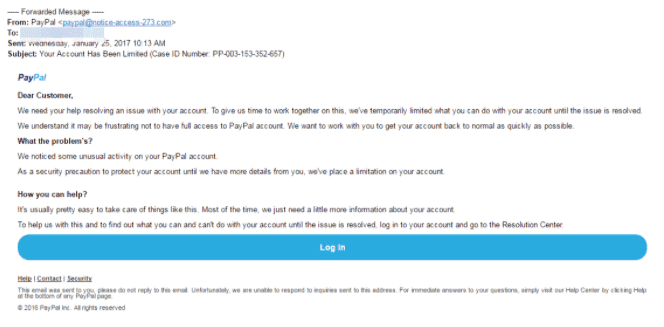
Below is a phishing mail mimicking PayPal. Most crooks can create bogus email addresses and even select a display name that does not relate to the email in any way.

What do Virtually all Phishing Emails have in Common

This is a nearly flawless scam email.  It is professionally styled and believable. The email uses PayPal’s logo at the top of the message, making it undetectable to an ‘ignorant’ target. However, there’s a huge red flag; the sender’s address is noted as ‘pa****@***************73.com‘ instead of having an organization name in the domain to indicate that it had come from an individual at PayPal, for instance, (@) PayPal.

Most hackers maximize their target ignorance, and in most cases, mere inclusions of a known company name anywhere in the message are enough to trick people. The targeted individual may glance at the word PayPal in the email address and be satisfied. In some cases, others may not even differentiate between the domain name and the local part of the address.

2. They are poorly written emails with an odd writing tone

Poor spelling and grammar should always be the first red flag for any email received, whether from a known or unknown source. Some people are convinced that such errors arise due to an inefficient “filtering system”; however, hackers exploit this technique on the most gullible targets only. The catch here is that if an individual is unable to pick the minor hints at the first stages of the intrusion, then most likely, they won’t be able to pick clues during the scammer’s endgame.

Automated attacks

When executing a phishing attack, hackers do not have to monitor inboxes and send tailored responses. To reach a wider audience and lure more victims, they prefer randomly dumping thousands of crafted messages on unsuspecting persons.

Important tip: look for grammatical errors and not spelling mistakes.

In most cases, hackers will use a translation machine or spellchecker when crafting phishing messages. These apps can give the right words with accuracies close to 100, but they do not necessarily arrange the words into the proper context.

What do Virtually all Phishing Emails have in Common?

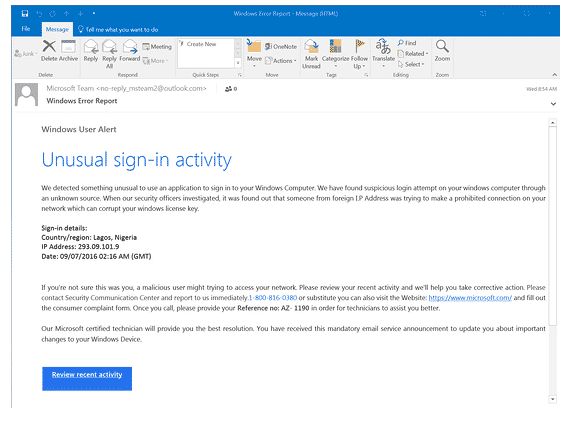
For example, the image shown above is a phishing scam imitating windows. Every word is spelled correctly except for various minor grammatical errors that a native English speaker wouldn’t make, such as “We detected something unusual to use an application.” There is also an array of missed words in various sentences such as “Please contact Security Communication Center,” “a malicious user might trying to access,” etc.

Everyone makes typing mistakes from time to time and especially when in a hurry; however, you should be able to thoroughly scrutinize the error if it’s a clue to something more sinister.

3. There are suspicious attachments or links

Phishing emails are launched in various forms. Although this article has majorly focused on email phishing, scammers can also use phone calls, social media posts, and text messages.

However, despite the channel or techniques through which phishing emails are presented, they will always contain a payload. All phishing emails are embedded with links to bogus websites or infected attachments, prompting you to download them.

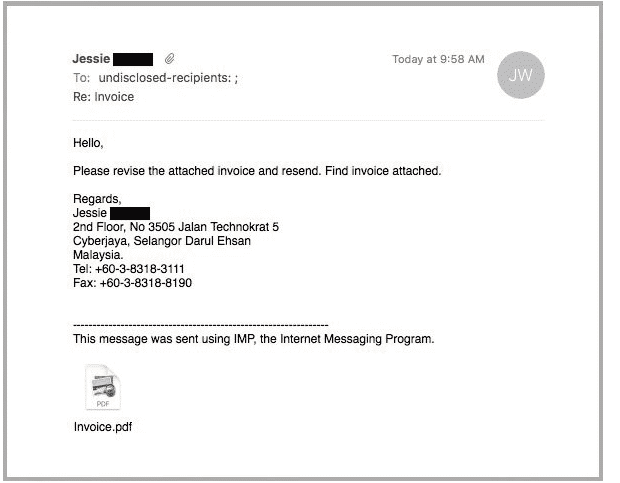
An infected attachment, in this case, is any document that contains malware. Below is an ideal example of a phisher claiming to send an invoice.

suspicious phishing attachment

From the above image, it’s impossible to know what the message entails until they open the attachment, whether the recipient was expecting to receive an invoice from the sender or not. Upon opening the message, the receiver will realize that the message is not intended for them, but then it will be too late, and the malware will have been unleashed on their computers.

4. There’s a sense of urgency, or the message calls for prompt action.

Hackers are aware that most human beings are procrastinators. Despite the significance of the message, most people will decide to deal with the information later.

The law of nature has it that the more you think or focus on something, the more likely you notice that something is off. Maybe in the day, you realize that the claimed organization doesn’t contact you at the same address, or perhaps you realize that your other colleagues at work did not receive the same email. Even if you don’t get the “Ahaa!” moment, reading the message with fresh eyes might unveil its true nature.

And for these reasons, most phishing emails request that you act immediately or that chance will be gone. A trait that is very evident in almost every example we’ve used above.

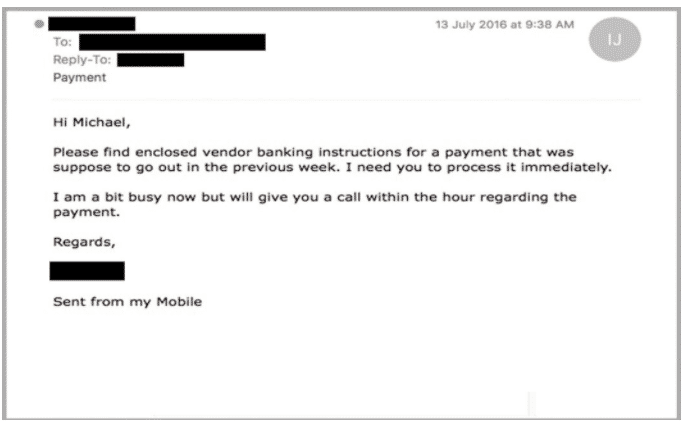
Below is a typical example:

typical phishing example

Such phishing scams are very sinister and dangerous at the same time since it jeopardizes the recipients’ (possibly a junior employee) position at work.

5. They have Oddly Generic Greetings

Phishing scammers target millions of people and therefore send lots of phishing emails a day. With this work volume, they heavily rely on phishing tools or applications to help them generate phishing templates. Commonly used greetings include “Dear Customer” implying “Your Company” or “Your Bank.” This kind of sensitive email should have more details about you as they originate from someone who knows you better, a partner you’ve met before, or a colleague you once served with at the same workstation.

Educate your employees to prevent phishing

Education is power, and knowledge liberates. Regularly remind your employees of what they should be looking for when handling mails or information within the organization. This does not necessarily mean having frequent awareness training programs as a few well-placed posters within the office can serve the purpose.

Top Managed IT Service Companies Share Insights Into NortonLifeLock & Avast Merger

NortonLifeLock( one of the global leaders in cyber safety) and Avast (one of the global leaders in digital security and privacy) recently announced that they have reached an agreement on the terms of a merger worth more than $8 billion.  According to reports, Norton will acquire all shares of Avast and will create a larger cybersecurity firm. ”Great merger. The combination of Avast’s product line with the power of LifeLock personal monitoring is a great combination for the channel”, said Michael Goldstein of LAN Infotech.

”Based on NortonLifeLock’s closing share price of USD 27.20 on July 13, 2021 (being the last trading day for NortonLifeLock shares before market speculation began in relation to the merger on July 14, 2021, resulting in the commencement of the offer period), the merger values Avast’s entire issued and to be issued ordinary share capital between approximately USD 8.1B and USD 8.6B, depending on Avast shareholders’ elections.”

The agreement comes nearly one month after both companies provided confirmation they were discussing a possible merger of both companies, which are publicly listed. 

According to the terms of the merger deal, Avast shareholders will receive a combination of cash consideration and newly issued shares in NortonLifeLock. The new company, which has not been named, will serve over 500 million users, including 40 million direct customers.

Transforming Cyber Safety

Vincent Pilette, NortonLifeLock CEO, said:

“This transaction is a huge step forward for consumer Cyber Safety and will ultimately enable us to achieve our vision to protect and empower people to live their digital lives safely.

With this combination, we can strengthen our cyber safety platform and make it available to more than 500 million users. We will also have the ability to further accelerate innovation to transform cyber safety.”

Ondřej Vlček, Chief Executive Officer of Avast said

“At a time when global cyber threats are growing, yet cyber safety penetration remains very low, together with NortonLifeLock, we will be able to accelerate our shared vision of providing holistic cyber protection for consumers around the globe.

“Our talented teams will have better opportunities to innovate and develop enhanced solutions and services, with improved capabilities from access to superior data insights. Through our well-established brands, greater geographic diversification and access to a larger global user base, the combined businesses will be poised to access the significant growth opportunity that exists worldwide.”

For quite some time, many online platforms have been facing various cyber threats and cyberattacks. The data of millions of users on different platforms and systems has been compromised. Ransomware continues to be on the rise. Cybercriminals are able to hide malware in different systems and applications, and consumers are often the victims when databases that have financial information and personal information are compromised. 

IT leaders and experts are hoping this merger leads to a more powerful cybersecurity protection product. The new product will include the benefits of Avast’s and NortonLifeLock’s. Cybersecurity continues to be crucial for consumers and businesses of all sizes, and there is hope that this step will lead to a more safe and secure life on the internet. 

”The cybersecurity industry is a team effort to combat the latest cybersecurity threats. Therefore, it is a great idea to combine the resources to fight for the same cause. The merger between NortonLifeLock and Avast will strengthen the cyber safety platform and provide it to many combined users. Furthermore, the merger should lead to antivirus products that include the benefits of Avast’s focus on privacy and NortonLifeLock’s experience in identity, all at a time when cybersecurity is critical for both consumers and businesses”, said Dr. Bennet Hammer,  President of Hammer IT Consulting, Inc.

Securing The Digital Landscape

NortonLifeLock, has promoted paid safety and anti-identity theft solutions for many years, whereas Avast has promoted both paid and free antivirus solutions. The merger combines Avast’s focus on privacy and NortonLifeLock’s focus on identification, producing a complementary product 

”Both these companies have largely been playing in the end consumer space. This segment has increasingly gotten more aware of the need for cybersecurity when it comes to protecting personal data. Also, these products are quite complementary to each other, wherein Avast helps prevent the breach and LifeLock comes in when a potential breach has happened already. We see this is quite a synergistic and strategic merger and a win for our customers as the merged entity comes out with a more holistic solutions that are inherently complementary to each other”, said Ashu Singhal who runs Orion Networks, an IT support company in Maryland.

”Mergers are usually a doubled-edged sword. From a “business standpoint,”  these companies saw great value in joining forces. One saw an opportunity to innovate, another saw money (in many different forms). But what does this mean for the customers using the lower-end security? Does this mean they must now pay fees? The cyber world gets more complicated every day and perhaps it is time the consumer world embraces the reality of paying for personal cyber, much the same way the consumer pays for home/auto/life insurance. The work from home paradigm shift is going to accelerate this. I am sure LifeLock looks at this as perfect timing and, from a marketing perspective, is tremendous branding for them. It builds their reputation and expands their product set”, said Mike Shelah of Advantage Industries.

”Also, acquiring the Avast database is a huge win. What I personally want to see from this merger is real innovation to bring enterprise-class service and solutions to the typical family or individual”, added Shelah. 

While the latest information did not reveal any specific or particular product plans, consumers and organizations should not be surprised if NortonLifeLock begins providing Avast solutions and vice-versa.

As mentioned previously, the new name following the merger has not been released. However, it will function by means of twin headquarters at NortonLifeLock’s main location in Arizona and Avast’s main operations, which lies within the Czech Republic. The deal is predicted to be completed in mid-2022 after regulatory approval is finalized. What are your expectations on the merger? What impact do you think it will have on the cybersecurity and digital landscapes?

14 Top DNS Security Best Practices

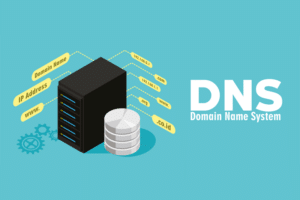
DNS security best practices are vital for all organizations since the service has become critical to almost all operations involving networked applications. It facilitates the communication of networked applications. Also, DNS has become dauntingly sophisticated in implementation and theory.

Meanwhile, cyber adversaries have increasingly set their eyes on attacking DNS infrastructure. An unavailable DNS service means applications cannot communicate, and this may halt essential operations. DNS security best practices are pertinent for ensuring the continuous availability and health of the DNS infrastructure.

The following list of DNS Security Best Practices can ensure DNS has a dependable performance and remains secure.

1. Ensure DNS logs all activities – One of the most important DNS Security Best Practices

Security professionals recommend DNS logging as an effective strategy for monitoring DNS activities and events. DNS logs provide valuable insights into whether malicious individuals attempt to meddle with the DNS servers. Other than the clients’ operations, DNS debug logs to identify existing issues in the DNS updates or queries.

DNS Security Best Practices

Moreover, DNS reveals any traces that point to cache poisoning. In this situation, a cyber adversary changes the data housed in the DNS cache to target clients with malicious inputs. For instance, changing the IP address of a legitimate website to that of a malicious website may cause the DNS server to redirect clients to malware-infested websites.

Such actions can compromise the security of an entire company. Whereas DNS debug logging is vital to strengthening DNS security, some system administrators may disable it to boost performance. Monitoring the network activity ensures timely detection of attacks, such as Distributed Denial of Service (DDoS) attacks.

2. Lock the DNS cache

The DNS locates a client’s query information and stores it in a cache as a reference in future usage. The process improves the response speed of the DNS servers when the client makes the same queries again.

However, cybercriminals can exploit the feature to alter the already stored information. Locking the DNS cache is an essential requirement needed to complement the DNS debugging log feature. This best practice enables system administrators to determine when to change the cached data. The DNS server only stores the lookup information for the specified time defined in the time to live (TTL).

Disabling the cache lock means the store information can be modified or overwritten before the expiry period of TTL, paving the way for cache poisoning attacks. Depending on the implemented operating systems, companies can choose to enable the default cache locking. The scale of the locking cache can be defined to go up to 100% to prevent altering the cache information until the expiry period of the TTL.

3. Enable DNS filtering

DNS filtering provides an effective way method of blocking users from gaining access to malicious domains or websites. It allows system administrators to block name resolutions of domains or sites known to contain malicious content. If a client proceeds to send a query requesting access to a blocked domain, the DNS server immediately cuts off all communications.

Therefore, DNS filtering minimizes the possibility of malware and viruses reaching the organizational network significantly. When a client cannot access a blocked, malicious webpage, the security control keeps possible security threats that target IT infrastructure at bay. Subsequently, IT security experts do not require to clean up dangerous malware continuously.

Additionally, a company may seek to block specific domains in line with existing IT policies. For example, many organizations block some websites to ensure the employees remain highly productive. Examples of such domains are video streaming, illicit material, social media, and gambling sites. System administrators can filter DNS requests according to groups or individual users or prevent all users from accessing specific websites.

Most frequently, modern firewall and software security solutions come equipped with standardized DNS filtering. Using such appliances provides companies with lists of malicious domains, which are updated regularly. Organizations can leverage automated DNS filtering and avoid the manual, absolutely inefficient manual entries.

4. Use DNSSEC to validate the integrity of DNS data.

The Domain Name System Security Extensions (DNSSEC) enables clients to receive only valid responses to requested queries. DNSSEC ensures integrity by digitally signing the DNS data sent to name servers. Once a client makes a query request, the DNS server checks to ensure that the response has a valid digital signature to alert clients that they can trust the sent information. DNSSEC is an additional security layer that assists in protecting against a DNS protocol attack.

Moreover, since DNSSEC provides origin authority and data integrity, attacks such as cache poisoning and DNS spoofing can be prevented successfully. Clients, therefore, remain confident they visit the intended pages.

5. Ensure accurate configuration of access control lists

Access control lists are vital to securing DNS servers from spoofing attacks and unauthorized access attempts. For the DNS servers to remain secure, only the system and IT administrators can access the primary DNS. Accurate configurations of the access control list to permit a specific host to connect to a name servers ensures that only the legitimate clients can communicate with the DNS servers.

Besides, access control lists should define the servers permitted to allow zone transfers. Cyber adversaries may attempt to use secondary DNS servers to send zone transfer requests to determine the organizational network zone setup. Blocking zone transfer requests made through a secondary DNS server prevents cybercriminals from obtaining zone information. The configurations are vital since they prevent malicious or unauthorized third parties from understanding the organization of the internal network.

6. Separate authoritative from recursive name servers

Authoritative name server scans only the local database to identify a name and the corresponding IP address. On the other hand, the recursive name servers search a hierarchy of additional name servers on top of the local database to identify a name and corresponding IP addresses.

Companies should use different recursive and authoritative name server machines to isolate and separate the roles according to the network’s logical views. Also, system administrators must configure authoritative name servers such that only other authoritative name servers can send DNS updates. Since authoritative name servers don’t have caching capabilities, corrupted or fraudulent database entries may have far-reaching impacts.

7. Use Anycast to enable forwarding routers to redirect DNS queries.

Routers utilize Anycast to enable multiple servers to use similar IP addresses and send network communication and messages to the most crucial server instead of a particular server. Name servers use Anycast to exhibit resilience, dilute the impacts of a DDoS attack to mitigate it, and share a workload.

Using Anycast increases the resiliency of a network since routers become dynamic and flexible to redirect traffic to the available but nearest server. If a company disconnects a server from its network, Anycast redirects traffic to the closest accessible server. As a result, the strategy increases the surface area of a system. The network part is exposed to security threats and attacks, thus mitigating a DDoS attack impact by spreading traffic across various servers.

8. Deploy dedicated DNS appliances

Like most network appliances, DNS applications are designed and built for a specific purpose. Therefore, both software and hardware are configured with performance, ease of management, and security in mind. Typical operating system servers do not possess the capabilities and levels of tuning offered in dedicated DNS appliances. The benefits of implementing dedicated DNS applications are similar to those of other network appliances, including maximizing the availability of the Random Access Memory (RAM), limit the driver requirements, restrict the chatter of different networks on interfaces, and limited unnecessary ports.

In essence, leveraging the use of purpose-driven appliances in DNS architecture means that it is possible to strip all unnecessary protocols, drivers, and applications, thus significantly minimizing the attack surface. The targeted functionalities enable security features, such as logging and monitoring, to focus on specific protocols and services. Furthermore, activities like audit logging, change tracking, and user administration can be significantly enhanced and targeted to relevant security functionalities.

9. Update the DNS server regularly

Cyber adversaries will always seek to exploit the security vulnerabilities present in the DNS server software. DNS is a prime target of attacks since it enables adversaries to use the DNS server for data exfiltration and command and control attacks. The risks underscore the essence of ensuring the DNS server software has the latest software updates to prevent attacks.

However, the independent server design can cause challenges in installing timely updates and security updates since the process is done on a per-server basis. The best strategy for installing architecture-wide updates is by opting for a centrally managed solution. Besides, since DNS servers are resilient and do not provide warnings once they are outdated, organizations must be proactive in deploying the security patches.

10. Ensure the recursive DNS queries have response time limits

Companies should ensure to use response rate limiting to throttle the speed through which authoritative name servers respond to queries made from a specific IP address. Most name server programs, such as NSD, Knot, and Bind 9.6.4 or later, support response rate limiting. A name server uses the response rate limiting to remember the times it has responded with the same answer to the same querier.

Once the rate exceeds the pre-configured threshold, the name server takes longer to send a response. Therefore, the name server will not be able to respond to queries any faster than the configured threshold. A name server compliant to the response rate limiting thus becomes immune to various DDoS attack types.

11. Hide the primary DNS server

System administrators should ensure to hide the organization’s primary DNS server from the public view. As such, they should configure the DNS servers visible to the public as slaves while designating the primary DNS server to be a master name server not visible to the public.

A hidden or stealth master name server does not record the NS records in a DNS database accessible to the public. Only the slave name servers can be accessed publicly. The slave and stealthy master architecture avert public interrogation of the name servers by zone or query transfer. Also, the architecture ensures the integrity of DNS databases of the slave name servers remains intact since only the concealed master server can upgrade slave servers through the push operation.

12. Configure the DNS socket pool

The DNS socket pool enables the DNS server to utilize randomized source ports for use in DNS lookups. Utilizing the random ports permits the DNS server to randomly choose a source port from a pool of idle sockets. Rather than use the same port for multiple operations, the DNS server selects a random port from the available pool, thus increasing the difficulties of guessing the source port used for source port DNS queries. Some operating systems support the configuration by default.

13. Harden the name servers

The name server computers should only run the name server software and the installed operating system. The name server computer should also perform a dedicated role in supporting the network activities. Installing other software products in the name server computer only attracts hacktivist attempts.

Besides, additional software can degrade the performance of the name server computer and may cause it to crash if bugs are present. On the same note, the only connection a name server should have is the network link for acquiring updates and for responding to DNS queries. Additional network cables or open ports expand the attack surface.

14. Ensure DNS high availability and redundancy

The DNS is the communication pillar of network applications and must, therefore, be available 24/7. Organizations should ensure the necessary redundancy by deploying at least a secondary and primary DNS server within the company. Also, implementing two servers at the very least can ensure business-critical run throughout.

Vital services, such as email, file sharing, and active directory services, depend on proper DNS operations. Ensuring redundant and high availability functional and healthy internal DNS servers ascertain the internal applications and devices communicate continuously.

DNS Security Best Practices – Summary

Implementing these DNS security best practices will ensure that your organization is well defended against hackers that may target DNS.  Have any comments, feedback, or a DNS Security Best Practice to add to this list?  Please leave me a comment and let me know.