Tuesday, April 14, 2026
Home Blog Page 298
AI cybersecurity guidance for small businesses

Know where your business is exposed, what matters most, and what to fix first.

CyberExperts gives small businesses AI-generated cyber checkups, practical recommendations, and recurring cyber hygiene monitoring — without enterprise consulting complexity.

AI Cyber CheckupIdentify likely weak points and get a prioritized action plan.
Recurring MonitoringStay current with updated cyber hygiene guidance over time.
Built for SMBsPractical recommendations for real-world small business setups.

Most small businesses know cybersecurity matters. Very few know what to fix first.

CyberExperts turns cybersecurity confusion into a practical action plan. Instead of vague fear, generic checklists, or expensive consulting, you get AI-generated guidance focused on likely risks, weak spots, and the most important next steps.

How it works

1. Tell us about your businessShare your team size, tools, email setup, device practices, and current security habits.
2. CyberExperts analyzes your setupOur AI reviews likely weak points, common risks, and practical cyber hygiene gaps.
3. Get a prioritized action planReceive clear next steps in plain English — focused on what matters most.
4. Stay current with ongoing monitoringAdd recurring cyber hygiene monitoring if you want updated guidance over time.

Start with a checkup. Continue with monitoring.

AI Small Business Cyber Checkup

A one-time AI-generated assessment that identifies likely weaknesses, highlights the biggest issues, and gives you a practical action plan.

  • Likely weak points and avoidable risks
  • Top-priority recommendations
  • Plain-English next steps

AI Cyber Hygiene Monitor

A recurring cyber hygiene subscription that updates your recommendations, flags likely weak spots, and helps you stay current over time.

  • Recurring reassessment
  • Updated recommendations
  • Refreshed priorities over time

What CyberExperts does — and does not do

Done by AICyberExperts is built as an AI-delivered cybersecurity guidance product.
For small businessesDesigned for operators who want practical guidance without enterprise complexity.
Not a magic guaranteeIt helps identify likely risks and prioritize what to fix first.
Recurring option availableContinue with ongoing Cyber Hygiene Monitor updates over time.

See your biggest cybersecurity gaps in plain English.

Start with an AI Cyber Checkup and get a practical view of what to fix first.

How to Invest in Crypto Safely?

Crypto investments are taken to a new level with the emergence of large and convenient crypto platforms and wallets for storing digital assets, but how to choose the safest crypto exchange among the variety offered on the Internet? Let’s discuss it today.

Here are some characteristics of the most secure cryptocurrency exchange:

  1. High level of protection against hackers. Only regulated centralized platforms provide the highest level of safety. They check every client and ask for KYC verification to ensure only honest people are working on a platform. If any suspicious activity is noticed, the user is blocked. All these actions help maintain a safe level of transactions for all other users.
  2. Fast and convenient cryptocurrency converter which shows all the needed information about a transaction – fees, prices, etc. The converter should calculate transactions according to the applicable rate in the market and indicate the commission without hidden fees.
  3. Availability of all large and popular crypto assets for trading. 
  4. Customer support.
  5. Access to advanced trading tools and financial instruments.
  6. Convenient and intuitive interface.
  7. Fiat support and no limits for withdrawals.

Following this list of requirements, we can underline some of the best platforms: Binance, WhiteBIT, Coinbase, and Kraken.

How to Invest Crypto on WhiteBIT?

Use a cryptocurrency converter to make it simple. First, move your funds to the trading balance. Then select the currency you have in the left column on the converter and the coins you want to get in the right one. See the current price and the fee. Once the commission is paid, you will receive the needed assets in your account. For more information on how to invest in crypto, welcome to the WhiteBIT Blog – it offers many interesting articles and manuals on trading as well as the latest news from the industry.

What digital asset to invest in?

The fundamental idea behind crypto investments is to purchase and sell cryptocurrencies at varying prices to generate income. Choosing a digital asset is crucial, and here is a list of criteria that can help you analyze cryptocurrencies:

  1. Price chart and historical indicators.
  2. Trade volume and market capitalization.
  3. Listing on major crypto exchanges.
  4. The essence and technology of the project, including the application of its coins.
  5. The community and founders of the project.

By analyzing digital assets based on these factors, you can determine if they are worth investing in.

How does email get hacked? (7 easy ways)

How does email get hacked? There are several techniques used to gain access to an email account using a password or backdoors.

With the rate of technological advancements, new technologies such as deep machine learning and strong artificial intelligence have led to more sophisticated ways of hacking emails.

No email is immune to hacking.  Therefore, every company must educate its workforce on common hacking techniques and how to prevent them.

In this article, I’ll walk you through the main techniques hackers use to access your email.

By the end of this article, you will be well-informed of the hackers’ techniques and as well as different tools and mechanisms you can use to prevent infiltrations into your account.

1. How does email get hacked?  By Keylogging

Keylogging is a simple way to hack email passwords or accounts. It involves monitoring a user’s activity and recording every keystroke typed on the computer keyboard. In most cases, this is achieved with the help of a spying tool known as Keylogger.

There are no special skills required to install software or program on a computer or network infrastructure. Keyloggers operate in stealth mode.  They are challenging to detect and can stay in the system for long periods without being identified.

These spying programs can also be installed remotely, so the attacker does not have to gain physical access to the target’s computer.

Keylogging is arguably the most straightforward breaching technique used by hackers to steal sensitive information from targets. Apart from hacking emails,  keylogging can also be used to spy on your target’s phone calls, messages, and other valuable credentials.

Methods Used by Hackers to Send Keyloggers to Computers

Fake Software

Recently hackers have developed the tendency of embedding keyloggers and other backdoors in software. At face value, it may seem like a legit mobile application, a PDF file, or a flash player update. When installing the software, the embedded Keylogger also installs as part of the application.

Since the emergence of the Corona outbreak, hackers have infiltrated more than 10 million emails. They embed keyloggers and local access Trojans in software that claims to track COVID spread. That’s how hackers trick users into downloading malicious software.

Phishing Emails

Phishing emails are fake emails sent to target computers to lure into a malicious course of action.  The mail contains corrupted files with malware that promptly installs in the background when downloaded by a user. This is the primary method used by hackers to spread Trojans and Malware.

Hackers also target work-from-home employees with phishing emails in an attempt to hack a corporates network. Most phishing emails prompt you to act immediately, a tactic you can use to identify such types of emails.

System Vulnerabilities

Hackers also use vulnerabilities and loopholes within a computer system or network infrastructure to inject a keylogger.  Vulnerabilities, in most cases, are a result of the running of outdated software, add-ons, or plug-ins.  Black hats identify vulnerabilities in web browsers and computers.

Phishing URLs

Phishing URLs may be at the bottom of an article, an app description, or behind a fake software.  These phishing links re-direct users to illicit websites such as pornographic websites, websites that ask for donations, or malware-infected websites. These malicious websites then install a keylogger to your system without the user’s knowledge.

Malicious Ads

Hackers also use malicious ads to send Keylogger to computers.  Malicious ads can also be found on legitimate websites used by advertisers to bid for space.

In some cases, the ads install a keylogger when you click on them, while others install the keylogger when you close them out.

That’s how hackers send keyloggers to your phone and computers easily.

After learning about how hackers can use these techniques to hack your email account, you should have a better understanding of how to prevent keylogger infection:

  • Avoid opening emails from unknown or malicious sources.
  • Download and install applications and extensions from trusted publishers.
  • Be cautious with advertisements you click on
  • Always scan the URL before clicking to verify whether it’s safe or not.
  • Install software updates regularly.

All in all, it’s your responsibility as a user to develop good browsing habits.

However, there are also user-friendly tools that you can use to help avoid becoming a victim of a keylogger attack.

Tools To Prevent a Keylogger Attack

  • Patch management

Patch management automatically looks for software updates online for your computer. Vulnerabilities are one of the major gateways through which keyloggers are introduced into a system. A patch management tool ensures that you have the latest updates with all security fixes for your operating system at any given time.

  • URL Scanner

URL Scanner employs AI to deep scan websites to countercheck whether it’s safe or malicious. All you have to do is highlight, copy, and paste the link in the provided space. It’s one of the most reliable ways to avoid being re-directed to malware-infected websites.  Some free URL scanners online include VirusTotal and Comodo Website.

  • Key Encryption Software

Encryption software can be used as an extra protection technique by concealing the characters you type on the keyboard.  The encryption software works by encrypting the keys with random numbers as they navigate through the operating system. The disoriented characters make it difficult for keyloggers to capture the exact keys.

  • Anti-Malware Software

This type of software protects you from a variety of malware. Anti-malware software scans through various files you download to prevent infiltrations by malware. This is one of the critical software that can protect you against malware attacks. With the rapid technological advancements, you should always go for the latest and the most advanced anti-malware software because sophisticated malware can get past the traditional anti-malware software.

2. How does email get hacked? By Phishing

Compare to Keylogging techniques, phishing is a more complicated method of hacking emails. Phishing emails involve the use of spoofed webpages designed to be identical to those of legitimate websites.

When executing this malicious social engineering activity, hackers create fake login pages that resemble Yahoo,   Gmail, or other service providers. If you key in your credentials on the fake login pages, black hats monitor your activity and steal the credentials.

Phishers are smart enough to send you an email that looks just like what could have been sent by Gmail or Yahoo. These emails contain links asking you to update your email account information or change the password.

In some cases, an online persona of someone you know at a close level is used to hoodwink you into providing your email login credentials.

To successfully execute a phishing attack, one likely will have considerable hacking knowledge with prior experience in scripting languages such as CSS and JSP/PHP.

Phishing is considered a criminal offense in most jurisdictions. Enabling a 2-factor authentication for your email is not sufficient protection against phishing attacks.

One needs to be very vigilant before giving out their email credentials despite how convincing the situation might seem to be. Always double-check the web address from where the email is originating from before dishing out your details.

If you have never requested a password change, then ignore any message prompting you to change, update or confirm your security details. These are scammers waiting to exploit you.

Warning signs for phishing attacks

  • Email from Unfamiliar Sender

Before opening that message you just received, there are several details you can check to verify whether you are a target for a phishing attack or the email is legitimate. First, scrutinize the sender’s details. It might be from a source you have never interacted with before, and if so, then check on the various online platforms to check its legitimacy.

  • The sender’s email seems off.

For instance, you may receive an email from jo**********@**go.cn, which resembles that of Joseph Goast, who works at Logo Inc.

Joseph might be a real person and work for Logo, as stated, but his account of details may have been manipulated by a hacker who aims at getting your credentials to hack your email account. The company name might be misspelled, or the email could have a wrong ending, such as logo.cn instead of logo.com.

Other signs to look out for may include:

  • The style of opening statements – if it seems oddly generic, then you need to take caution against clicking any link or downloading an attachment as they may be corrupted.

3. How does email get hacked?  By Password Guessing and Resetting

Email accounts can also be hacked through password guessing, a social engineering technique exploited by most hackers.

Password guessing techniques best work with those whom you know or those whom you are close to. In this type of attack, an attacker aims at manipulating the target in an attempt to figure out their personal information.

Password guessing and resetting require a witty person with impeccable thinking power who can almost read the victim’s mind.

For the attack to be successful, an attacker needs to know the target considerably well, which calls for an A-class social skill.  Black hats that often use this technique tend to be colleagues, friends, or even family members. Such persons might have in-depth knowledge about you, be it hobbies, lifestyle, habits, and even personal information such as birthdates.  This makes it easier for persons to figure out your email password. They also may be able to answer security questions while resetting your email’s password easily.

4. How does email get hacked?  By not logging out of the account.

Always ensure to log out of your email after using a public device or PC. It’s advisable to develop a tendency and a habit of logging out every time you sign in using a shared device or public computers. Otherwise, avoid signing in to your accounts using public PCs altogether. Avoid using computers at internet cafes and libraries to access personal accounts or corporate websites as it’s not easy to identify whether they are infected with keylogging spyware or malware.

5. How does email get hacked?  By using easy passwords

Do not use the same password across multiple platforms.  If you have been doing so, it’s time to change and get unique login credentials for every website or service you need. A good rule of thumb is to make the password not less than 16 characters, and at least one should be a number or a unique digit.

For the sake of future use, you can base them on a complex sentence, with the first letter of each word serving as a character in the credentials. Hackers find it easy to hack email accounts with weak passwords through trial and error techniques.

Several tools are available, which use artificial intelligence and machine learning to monitor your activities and match your web activity. From such data, black hats can analyze and predict what you are likely to use a password, so up your game.

6. How does email get hacked? By using an insecure Wi-Fi network to access your email account

Hackers easily bypass unsecured Wi-Fi network infrastructure and eavesdrop or intercept the connection to get the password and other valuable information. To avoid such incidents, you should only connect your devices to reputable networks that are password protected and can be trusted. You can use VPN services such as HMA! or AVG Secure VPN to secure and encrypt your connection.

7. Spammers harvested your email.

Your email can get harvested by scammers if you list it publicly online in places such as blogs, online forums, online ads, and so on.  For the sake of your security, don’t list your email address on such platforms.  Avoid such acts like the plague!

There you have it, the seven common ways in which your email can be hacked. So be woke!. Follow the above-stated advice, and it will take you a long way in preventing an email hack from befalling you.

Kaspersky Partners with ownCloud For Enterprise Collaboration Protection

ownCloud and Kaspersky have declared their collaboration in the technology partnership with the goal to assimilate Scan Engine from Kaspersky and ownCloud’s platform. The collaboration was planned to be made via ICAP protocols, with the purpose to do scanning procedure in a different, separated server in order to maintain the platform’s power while allowing more scalability and easier maintenance.

Within the rapidly growing technology, cybersecurity concerns arise. Data protection still becomes the most critical aspect of cybersecurity for half total of organizations in United Emirates Arab. 

Now, each company’s existence of a file collaboration platform could work and share their files freely in a more secured environment to keep their data remains controllable. It’s definitely vital to prevent all kinds of malicious acts that could enter the system; a more improved scanning for anti-malware plays a considerable part.

About Kaspersky

The long-known company is still entitled to the identity of the industry leader in essential virus protection. Well, most users said it’s easier to use due to its more straightforward interface, real-time malware protection, and affects only little to none to overall device performance. 

Though it has abundant features to consider, including password manager, cloud protection, and a VPN service, the cost that covers them doesn’t need to be necessarily expensive. An example, for the VPN part, you can always depend on others that give ultra protection at a much affordable price.

Examples are the most trusted VPNs for MacOS by Cyberghost, which works brilliantly and costs lightly. The privacy policy is also one concerning aspect, definitely important, but highly missable.

As for the recommendation, this software does a decent job at protecting any device and definitely deserves a place in any antivirus tools recommendation. There’s a 30 days trial to check whether it’s suitable for you or not. Plus, there are occasion discounts which are excellent for testing.

There are millions of others who depend on Kaspersky as antivirus software. However, Kaspersky did involve in an alleged security breach that left many questioning the integrity and trust of this company.

Back in 2015, the media claimed that Kaspersky has involved in a grave data breach scandal. Some claims mentioned the company re-hired (or replaced) some of its staff with members from the Russian government. A big question arose regarding this decision.

With nothing to be clarified, the media left with their own perception. They often mentioned that this decision was made to steal the data from US intelligence. US government department took it seriously by banning Kaspersky to be used for their computers.

The rumours did hurt the company, though the truth hasn’t been discovered. 

About ownCloud

The company that started its journey back in 2010 has grown to be a credible and dependable company that’s serving as open-source platform for various specific projects. Initially serving institutional customers, ownCloud began its step to serve the paying customers in 2012. 

Functions as an alternative to Dropbox, ownCloud quickly became one of the most known projects with more than a thousand contributors. Its milestone was reached in 2014, where the company received funding of 6.3 million dollars, with the users reaching the number of 1 million. 

ownCloud has proven itself to be completely credible and dependable as an open source for corporate industries and scientific endeavours. The company has augmented its central core, features and integration to reinforced its Enterprise Edition.

Nowadays, when most of its workers work remotely, ownCloud continues to develop and support the platform. There’s no dividing wall to be feared of. Anyone from companies, schools, and government institutions can easily share their documents and works seamlessly. Now, ownCloud has been used by more than 500 companies and millions of individuals.

Enterprise Collaboration Protection Partnership

The partnership between two giant companies, Kaspersky and ownCloud, has made the scanning integration that focuses on performance and usability possible. The Scan Engine from Kaspersky guarantees the all-inclusive protection against malware and dreadful viruses, such as Trojans, worms, and others.

While providing protection, the Engine also gives traffic scanning for HTTP, plus reputation checking for URLs and Files. Now that the scanning procedure is performed on the server-side, it makes the job easier for the corresponding admins, thanks to the integration.

As Head of Technology Alliances at Kaspersky, Alexander Karpitsky, this collaboration with ownCloud is made to ensure all positive points of private cloud technologies that are enveloped in a more secure and safe environment guaranteed by the top solution for anti-malware, such as Kaspersky Scan Engine. 

Users will be able to deliver and share their documents worry-free from various malware and generally harmful viruses. This partnership opens the door to many opportunities, especially when the growth of technology is inevitable.

10 Password Policy Best Practices

Password policy best practices are vital for companies to sufficiently protect private, sensitive, and personal communication and data. System end-users use passwords as a front defensive line to prevent unauthorized users from accessing protected systems and information. As such, proper password policies and rules must be implemented to alleviate security challenges resulting from poor practices and weak passwords.

Password policies comprise rules created to enhance computer security in the face of rising cybersecurity challenges. The policies encourage system users to create secure, reliable passwords and store them securely to ensure proper utilization. Every organization is responsible for developing strong password policies, maintaining them, and updating them accordingly.

Importance of Password Policy Best Practices

A recent Verizon Data Breach Investigation Report showed hackers exploit any opportunity arising from poor password policy best practices. The report confirmed that complex password policies that do more harm than good are the number one cause of cyber-attacks and data breaches. Moreover, stolen credentials (usernames and passwords) and phishing attacks were singled out as the topmost strategies for breaching a protected system.

As if poor password policies are not enough, a 2019 State of Password and Authentication Security Behaviors report revealed interesting statistics concerning employee password protection. It showed that 51% of the involved respondents reuse the same password to secure personal and business accounts. At the same time, 68% of the participants admitted to sharing vital passwords with their colleagues. A more worrying trend is 57% of participants involved in a phishing attack disclosing they don’t adopt more secure password practices. These are alarming statistics that demonstrate why businesses in all industries need to maintain effective password policy best practices.

Current Password Policy Standards 

Passwords are supposed to address authentication challenges but have instead become a source causing significant problems. Most users continue creating weak, easy to guess passwords and reuse them across different accounts. On the other hand, password policies evolve as new security demands arise. Therefore, experts and regulatory bodies have placed a lot of emphasis on what constitutes best password practices.

        National Institute of Standards and Technology (NIST)

NIST develops and updates information security guidelines and standards for all federal agencies, but organizations in the private sector can also use them. NIST addresses password policy issues in the NIST Special Publication (SP) 800-623B (Digital Identity Guidelines – Authentication and Lifecycle Management). The publication provides an innovative protocol for enhancing password security. For instance, it encourages system users to create an easy-to-remember, difficult-to-guess password otherwise referred to as memorized secrets. The publication also discourages other complex password requirements recommended in the past. The recommended passwords must contain eight or more alphanumeric characters, while system-generated passwords must have a minimum of six characters.

Moreover, the NIST publication recommends users check passwords against a provided list of passwords deemed universal, compromised, or expected before securing their systems. The disallowed passwords upon checking include dictionary words, passwords identified from past breaches, sequential or repetitive passwords (e.g., 1234qwerty), and context-specific terms. Other NIST password policy best practices include:

  • Enable the paste functionality on the password entry field to facilitate the utilization of password managers.
  • A system should store a salted hash instead of passwords.
  • Enable systems to permit users to display passwords when entering them, instead of the more secure dots or asterisks.
  • Enabling multi-factor authentication
  • Using authenticated protected channels and approved encryption to request memorized secrets.

    Department of Homeland Security (DHS) recommendations

The DHS has created a card for creating strong passwords to assist users in protecting systems and information from online threats. The card provides simple guidelines, some of which are similar to NIST password requirements, to help reduce the possibility of a security incident. The tips include:

  • Create passwords with more than eight characters.
  • Use a passphrase containing a combination of capitalized and small alphabets and punctuation marks.
  • Avoid using common words and personal information to create passwords.
  • Use unique passwords for different accounts.

    Microsoft Recommendations for Password Policy

Microsoft has used intelligence gained in past years to develop recommendations for both end-user password policies and administrator password policies. The information is from tracking threats, such as phishing attacks, bots, trojans, and worms. Microsoft also stresses the essence of focusing on frequent employee training to ensure all system end-users can identify the latest security risks and apply password policy changes effectively. Microsoft password policy model recommends passwords based on access and identity management that adhere to the following best practices:

  • Maintaining passwords with precisely eight characters.
  • Users are not obligated to include special characters, such as *&(^%$.
  • Periodic password resets should not be enabled in user accounts.
  • Educate system users about the risks of reusing the same passwords.
  • Enforce multi-factor authentication.

Password Policy Best Practices Recommendations 

The system administrators in all companies should consider the following suggestions to create a strong password policy:

  • Insist on Multi-Factor Authentication 

Multi-factor authentication (MFA) secures data and information systems by requiring users to provide additional methods for proving their identity and authenticity. It is a highly effective strategy that requires users to input a correct combination of username and password and provide other items as proof of identity. They can include a text code sent to a mobile device or confirming a biometric registered as the extra authentication item.

MFA prevents users that lack required access privileges from accessing protected information and IT infrastructure. Also, MFA protects secured items from access through stolen credehttps://cyberexperts.com/a-guide-to-multi-factor-authentication-mfa/ntials.

  • Implement a Password Age Policy

It is a policy that indicates the minimum time a password can be used to determine the required length of time for users to change their passwords. A minimum password policy is vital since it prevents system users from reverting to their old passwords after creating a new one. The minimum age password policy should specify a time of three to seven days before prompting users to create new passwords. The policy allows ample time for changing the existing passwords and ensures users cannot switch back to passwords used in the past.

System administrators should, however, take into account that passwords can be compromised. A minimum age password policy can prevent users from changing compromised passwords, and admins should be available to make the required changes.

  • Use Passphrases

Passphrases provide stringer security compared to single-worded passwords. For instance, consider a sentence like” I Love Spending Time At The Zoo Every Sunday. ” Using the sentence to generate a passphrase like ILSTATZES results in the creation of powerful passwords. Alternatively, using the entire sentence to create a passphrase with a combination of capital and small letters reduces the odds of hacking it. It is easy to remember a passphrase, yet it provides more robust security.

  • Enforce a Password History Policy 

When prompted to create new passwords, most users tend to reuse passwords created in the past. Despite it being an accepted practice, organizations should implement a password history policy that determines how often a user can reuse an old password. A useful password history policy should be enforced to enable a system to remember a minimum of ten previously used passwords. Such a policy prevents users from alternating between common passwords by discouraging the reuse of passwords. Hackers can use tactics like brute-force attacks to compromise systems secured using common passwords. Although some users may workaround a password history policy, implementing a minimum password age policy is a preventative control.

  • Create Unique Passwords to Protect Different Accounts 

Many users often fall into the temptation of using a single password for multiple accounts, not to forget which password is for which account. Such a practice is dangerous since a malicious individual can break into one account to access all other accounts. A single password for each account increases the defense layer of the protected accounts. It is also vital not to reuse old passwords when securing different systems. Password reuse and applying one password for several accounts simplify hackers’ ability to compromise information and information systems.

  • Immediately Reset Passwords no Longer in Use.

Disgruntled employees can turn to be the worst enemy to a business due to insider knowledge. System administrators must hence reset passwords of accounts belonging to employees who no longer work for the company. Motivation factors, such as revenge, monetary gains, and continued access to vital information, can cause ex-employees to use their old passwords and gain access. Companies should empower IT and HR departments to take action immediately an employee leaves the building. They should document the undertaken action in line with the respective password policies.

  • Always Log Out 

Businesses should make it mandatory for employees to log out of their computers once they leave their workstations. Employees must sign out from all accounts that are not in use to prevent insider threats and hackers from accessing confidential information. To ensure everyone adheres to the policy, system administrators should set computers to lock or sign out after a given period when they are not in use. Furthermore, users should revoke permissions granted to third-party applications integrated with the main account. Hackers can attack applications with weaker security to gain access to the main account.

  • Clean Desk Policy 

A Clean desk is among the most effective password policy best practices. A clean desk policy requires users to ascertain their desks and workstations are devoid of physical objects containing sensitive information, such as passwords. Some users prefer writing down passwords on a piece of paper to avoid forgetting them. However, they may end up leaving the same passwords for all and sundry, providing instant access to everyone. To prevent this, users must ensure to clean their desks before leaving.

  • Secure Emails and Mobile Phones 

Malicious actors can use mobile phones and emails to reset the passwords of connected accounts. Most accounts provide a “forgotten password” function that enables users to receive a unique link or code on the specified device or email account to create a new password. Anyone with access to the devices or email accounts can change passwords at will and retain access privileges. Secure ways of protecting the devices include using strong passphrases and biometrics security, such as fingerprints.

  • Utilize a Password Manager 

Password manager tools are increasingly becoming a priority for professionals and businesses. Password manager tools, such as Zoho Vault and Lastpass, are practical for organizing passwords and practicing high password security levels. Using a password manager requires users only to remember a master password to access other passwords stored therein. Password managers are also beneficial since they provide suggestions of strong passwords to secure different accounts and automatically sign in a user. Where possible, creating and automatically saving passwords using a password manager is highly recommended.

Practices to Avoid 

Password policy best practices exclude the following methods in regards to password security and management:

  • Using Dictionary Words: users must avoid using words found in a dictionary to create a password. Irrespective of whether it is a single word or a combination of words, passwords created using dictionary words are susceptible to dictionary attacks.
  • Using Passwords with Personal Names: passwords that reflect personal names or names of a place are weak and insecure. With social media, hackers can scan a target’s social media profile to establish critical personal details like family members’ names and frequented places and use them to hack a password. Also, slight variations of personal information do little to enhance password security since cyber adversaries can patiently try all letter and word combinations to determine the correct password.
  • Reusing Passwords: industry experts cannot stress enough the risks of reusing old passwords in the same or across multiple accounts. Users must create brand new passwords since reusing increases the dangers of malicious actors and insider threats cracking reused passwords.
  • Using String-Based Letters: users can be sure that any letter strings in a keyboard, say qwertyuiop or mnbvcxz, are already in a password dictionary. String-based letters are easy and simple to crack.
  • Sharing Passwords: users should desist from sharing their passwords with other colleagues. Not only can the passwords be misused, but cyber actors can also intercept them if shared through insecure channels. 

Security Awareness During the Covid-19 Crisis

Security incidents have increased as criminals seek to take advantage of the coronavirus pandemic. The crisis has led to a surge in the number of cyber-attacks, malicious activities, and phishing scams, making cybersecurity awareness more significant than ever before for corporations, organizations, and other business entities.

In a bid to curb the virus, employers had to implement a work from home policy. The change in the working environment has provided hackers with new opportunities to exploit. Black-hats see remote workers as a weak link that can be utilized to gain access to corporate networks and steal sensitive information, install ransomware, or create backdoors. In this article, we’ll look at some of the basics of security awareness. We examine it’s fundamental for your remote workers during this period of the Covid-19 crisis.

What is security awareness?

 According to Gartner, security awareness is a formal process of educating and training employees about IT. It involves:

  • Programs on how to enlighten employees on cybersecurity
  • Responsibility of every individual to upholding the organization’s security policies
  • Techniques for auditing the effectiveness of the efforts

The first point is the basis of a security awareness program. However, it’s necessary to hold employees accountable and outline how you’ll measure the effectiveness of an organization’s security measures.

The process can be broken down into four stages;

  1. Determine the current awareness status within your organization.
  2. Crafting a comprehensive awareness program
  3. Implementing the said program
  4. Evaluate the program’s progress and come up with recommendations for revising what was not well executed.

Types of security awareness

  • Top-down awareness technique

It is not the employee’s responsibility to learn of the required code of practice or security best practices and apply them at work. It is the organization’s responsibility to train and educate its employees on matters concerned with security. From CEO to a part-timer, any employee can be an easy target if they are unaware of the potential for attacks and how they can succeed. Trickling this kind of knowledge from top executives eases the deployment process and ensures that every employee knows how to keep the company safe at their level.

  • Budgeting for awareness programs

One of the best indications of a company that is well-positioned security-wise for attacks is with a budget that covers security awareness. It shows how serious an organization is taking security compared to how funds have been allocated to other elements.  If you are in a company that considers just sending email updates as security awareness, then you can be sure that you’ll be soon under siege.

Having a comprehensive security awareness program within your institution is just one piece of a reliable protection plan. Other primary elements of a viable protection plan would be:

  • Creating a security policy
  • Identifying vulnerabilities within your company
  • Allocating resources to enhance security technology

However, security awareness is the most important.  Companies should invest in security awareness just as much as they invest in software and other forms of security tech. No security tech will be successful if your workforce is an easy target for phishing attacks.

  • An organizational structure geared towards security awareness

This approach to security awareness is vital as it impacts everyone within the organization. More like the top-down approach, integrating an awareness program within an organization’s structure makes everyone’s job easier.

If possible, some employees should be exclusively tasked with implementing your security awareness program. At worst, there should be a single person responsible for the execution of this duty. Executives must give the team or individual tasked with implementing the awareness program full support.

  • Using a combination of different media to reinforce the message

We have covered the use of emails on sensitization about security a couple of times. They are excellent and can be adopted across the organization. However, you should have a blend of media forms to ensure that your company’s message about security awareness never gets ignored by the targeted persons.

For example, you can have internal workshops and talks within your organization about security. Afterward, emails may be sent and other short clips for communication through different media like instant messaging. Posters around the office may also work. The list of viable media forms goes on and on.  The point is to make sure that the message is not complacent but is highlighted as very important.

  • Highlight recent attacks that hit news headlines

This is a very significant approach to security awareness. Ensure that you highlight all kinds of attacks and not only those that make headlines. This type of consciousness aims to show your employees how prevalent cyber-attacks are and how your system can be bypassed, and identify weak points that could be exploited within your organization’s infrastructure.

The best way is by finding attack news on companies of your size or those within your industry.

  • An awareness by cyber professional

For an organization with no security measures in place, going to a third party skilled in this area may serve the purpose.  Competent experts will get you up and running and ensure that you recover the lost time. Even with comprehensive security awareness in place, it’s still necessary to bring an expert to check up and provide suggestions on what areas need improvement.

Security Awareness for Remote Workers during Coronavirus (Covid-19) Pandemic

More than ever, security awareness is now of utmost importance for your remote workers. It’s fair to say that the world has never seen more people working from home as it has during this crisis. Most companies have shifted their policies to help curb the spread of the virus. On the other hand, cybercriminals see remote workers as a weak link to gain corporate networks access and perform their intended malicious action.

An organization may have trained its employees on significant security concerns and cautions to take before the virus came to be. Most businesses may have given their employees security awareness training on risks they are likely to encounter, recognize various threats, and the best response for multiple threats. However, working from home due to this novel virus introduces many new risks and vulnerabilities that may not have been covered during the previous awareness training sessions. Also, regular training is necessary for remote workers, as risks increase when employees work from home.

In the section below, I’ll highlight some of the critical areas that MUST be addressed in work from home security awareness for remote workers.

Security Awareness for Remote Workforce is becoming a Necessity as COVID-19 Crisis Deepens.

SpamTitan, one of the leading email security solution providers, advocates for the use of robust layered technical defenses and email security solutions as we sink deep into this health crisis.  However, despite how adequate the technical controls might be, they cannot stop all intruding inboxes’ threats. It might be tempting to put all your trust in technical security solutions. The truth is that, even with the best solutions in place, security infiltrations can still take place.

Several studies and research have highlighted the significance of providing security awareness to the workforce and the benefits that accrue in doing so. One such study conducted by KnowBe4, a security awareness training provider, uncovered that 37.9 percent of employees fail phishing tests if they have never gone through security awareness and social engineering training. A percentage that increased by 8.3 in the previous year. However, the figure dropped to 14.1 percent within 90 days after security awareness training to employees and phishing email simulations performed.

The volume of phishing emails and false campaign emails targeting remote workers have significantly increased during this Covid-19 crisis.  Hackers aim at getting login credentials to SaaS platforms, emails, and VPNs through phishing campaigns.

Covid-19 was abruptly announced as a global pandemic, giving companies a concise period to strategize their adjustment plans. As a result, the rush to change from a mostly office-based workforce to a remote workforce might have seen security awareness training for employees put on a back burner.

However, the situation does not seem to be getting any better, with China experiencing the second wave of the virus. This implies that lockdown is likely to be extended for several months, and cyber-attacks targeting remote employees are bound to increase. Therefore, it’s essential to ensure that awareness training is provided to the remote workforce as soon as possible.

Increasing COVID-19 Domain Registrations and Web-Based Attacks

A comprehensive security awareness training for remote workers should also cover internet security as not all risks and threats will make it to the inbox.  Hackers are evolving day by day and exploiting the new vulnerabilities being caused by the crisis. Phishing attacks used have a web-based component, and also, there are several malicious websites set up by black-hats for drive-by malware downloads.  Most hackers currently use Novel Coronavirus and COVID-19 tricks to lure remote workers into downloading ransomware, malware, or access their login credentials for whatever corporate that’s being targeted.

An analysis conducted by Check Point Research revealed that approximately 42,000 domains related to Coronavirus and COVID-19 had been registered by the end of March 2020.  And of the total number of those registered domains, 50 percent are likely to be malicious compared to other domains registered over the same period, as uncovered by Check Point Research.

It’s essential to raise awareness of the risk of using BYOD’s for corporate activities. There should be a limitation on what can be used to access the company’s website, standard security configuration for all BYOD’s within company infrastructure to be adhered to, and a list of websites that employees can access while using office devices.  Above all, a security team should be in charge of identifying and blocking access to known malicious websites that hackers commonly exploit for fraud, distribution of malware, or phishing activities.

Shadow IT is a Major Vulnerability

For office-based employees connected to a corporates network, it is easy and more straightforward to identify the unauthorized software and hardware used by employees (Shadow IT). As for the remote workforce, it’s challenging to identify shadow IT, but the risk of malicious software being installed onto the device issued by corporate also increases.

Unauthorized software’s loaded onto corporate-issued devices carries a risk of malware infection and consequently increases attack-surface that hackers can easily exploit. IT teams have limited access and visibility into the unauthorized software. They cannot determine whether it’s running on the latest version and whether it has been patched against known vulnerabilities or not.

The ambiguity caused by shadow IT leads to several unidentified loopholes within a network infrastructure. It’s, therefore, significant to cover shadow IT in security awareness training for your remote workforce. Give them an in-depth explanation of why no software, apart from the ones listed in the company security policy, should be installed on a work device. Also, make them understand that they should seek authorization from the IT department on what USB devices or other storage devices can connect to corporate devices. Without such measures, the remote workforce may turn to be the weakest link in your organization during this pandemic.

COVID-19 crisis has seen most organizations turn to teleconference platforms to communicate with employees, partners, and other stakeholders.  One of the most common teleconferencing platforms used by most organizations is Zoom.  Research by some experts has shown some malicious installs of the genuine Zoom software but with malware bundled in it.  Other installers have also been identified that install Remote Access Trojans, Coinminers, and adware that can be damaging.

Scammers Gaining from COVID-19

In recent weeks, we’ve seen several scams hit news headlines, with criminals seeking to take advantage of the public concerns, such as application for support due to school closure, reclamation of money lost during holidays, and so on.  According to an analysis done by Google, scammers are sending 18 million Covid-19 related phishing emails to Gmail users in an attempt to steal sensitive data, lure victims into downloading malicious software’s or donate to vague causes.

Fake domains related to COVID-19 by April 2020
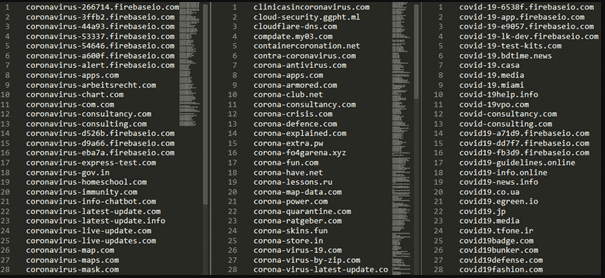
Fake Covid19 Domains

Recent campaigns have also seen cybercriminals mimic legitimate authorities such as HMRC and World Health Organizations through fake emails and websites to compromise targeted accounts, infect devices with malware, and steal confidential information.  Scams promising to offer advice about financial support, how to access personal protective equipment, how to avoid being infected, and those providing updates about the virus have been the most prevalent in the recent past.  Research has shown that the click rate of phishing attacks has increased from less than 5 percent to over 40 percent due to hackers’ tricks of provoking users’ fear and curiosity and encouraging them to respond promptly.

In most cases, hackers start the campaign through social engineering, through the following scenarios with a call for action coming in later stages of the organized cybercrime;

  • Acquisition of fake products such as vaccines, medicines, and masks.
  • Opening accounts in malicious websites
  • Installing malicious android software and applications which creates backdoors for hackers to access your device or network. The apps help to bypass the 2-factor authentication mechanism meant to secure your system and accounts.
  • Malware installation on devices, Windows in most cases. Various have been noted during this COVID-19 crisis, such as the infamous Emotet and Ryuk ransomware.

Various ongoing campaigns using the COVID-19 template
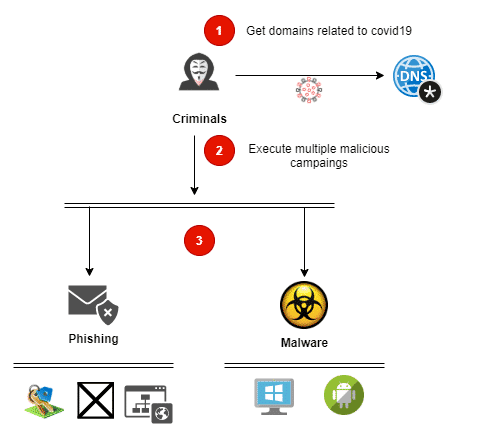
attack campaigns based on covid19

From phishing to malware

Emotet and Trickbot have been the most prominent “winners” during this pandemic. Hackers have used this malware to reach a higher number of victims using COVID-19 templates. Cybercriminals encode the victim’s data and demand a ransom.

Abuse.ch shows, from a global perspective, how COVID-19 templates are bundles with other common threats. Different malware samples, such as HawkEye, AgentTesla, Formbook, NanoCore, and MetaMorfo, have been used.

A list of malware with Coronavirus template
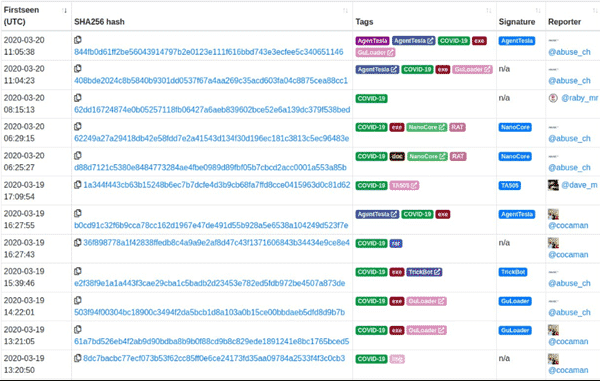
List of Malware

Currently, malware attacks on Android devices pose as one of the most challenging scenarios for organizations with many remote workers. The modern attack techniques have infection rates that are far superior to traditional techniques.

Attacks that have occurred in the recent past takes place in two steps;

  • The target is convinced to download a COVID-19 tracker or any relevant COVID app outside the Google Play store.
  • After it has been installed, the malware takes over control of the device and then demands about 100 USD in Bitcoins.

Therefore, companies, organizations, government institutions, and other work-from-home employees should invest heavily in employee security awareness.

Employees currently working from home should think three times before clicking that link or downloading that software onto your BYOD.  Yes, it might take you less than 20 seconds to click the link, but a lifetime to recover from the damage caused.

Beware, take caution always!

Share on Facebook
Facebook
Share on twitter
Twitter
Share on linkedin
LinkedIn
Share on mix
Mix
Share on pinterest
Pinterest
Share on tumblr
Tumblr

Healthcare Cybersecurity: Tips for Securing Private Health Data

The cybersecurity market is growing at a rate of 8%. According to 2019 research, it is expected to grow from $66.86 billion in 2019 to $91.09 by 2023. This paradigm shift has happened because of the inadequacy of cybersecurity agencies to counter cyberattacks.

Cybercrimes are at an all-time high in 2021 and have now started affecting the healthcare industry in a big way.

Every industry is gradually starting to move online. Similarly, the healthcare industry has also embraced a cloud-based approach for maintaining customer records instead of traditional means. Before we begin with the tips to protect your healthcare venture, let us understand what challenges businesses face.

5 Healthcare Cybersecurity Challenges that Organizations Fac

Ransomware challenge

Healthcare organizations keep getting challenged at every step. Cybercriminals ask them to lend the desired money (ransom) in exchange for the information they stole from the device. The data can be critical customer data or research papers.

Cloud hacking

A large chunk of data nowadays gets stored on the cloud by healthcare businesses. While the cloud is a safe means to store data, it isn’t unbreachable. Hackers can still find loopholes and steal critical information. If the cloud company does not employ the latest methods, the data can get compromised.

Misleading URLs

Although search engines like Google work hard to tackle plagiarism, they fail to stop hackers from creating replicas of healthcare brands’ websites. Some hackers replace .gov with .com and make the website look identical. If customers/patients trust such websites, the results can be devastating. The hackers can obtain critical information and sell it on the black market.

Phishing emails

Cybercriminals send substantial emails to original customers/patients asking them to share their information. The emails are meant to look the same as those sent from a company. If the prospects get trapped in the mix of things, they will leave their information vulnerable in the bad guys’ hands. Healthcare companies have to work hard to make their emails look original from that of the hackers.

Employee incompetence

Employees are humans, which is why they can make catastrophic mistakes. Unencrypted devices, weak passwords, and free admin access are common reasons behind security breaches. Healthcare organizations have to train their employees for all possible attacks to avoid mishaps.

5 Tips for Securing Private Health Data

1.           Train your medical staff

As we mentioned in the point above, training your staff is of the utmost value to prevent data breaches and mishaps.

The best way to do this is by hiring a consultant who can address your staff’s capability to tackle situations and undertake the necessary steps to improve their competence.

Trained staff will have the necessary knowledge to understand and repel a cyberattack by ignoring phishing emails and reporting replica websites of their healthcare organization.

They will also adhere to strong passwords, strong encryption, and restricting admin access to prevent an attacker from accessing all such information.

2.          Switch to a wildcard SSL certificate

It is good to have a regular SSL certificate installed on your healthcare website but, what about all the subdomains of your website?

A healthcare organization can have multiple subdomains such as a consultancy website, pharmacy website, and registration website.

A regular SSL certificate cannot protect all these subdomains. Instead, it is best to install a wildcard SSL that provides equal protection to all subdomains. Wildcard SSL is cost-effective and robust compared to a regular certificate, which is why it is an appropriate choice for healthcare firms.

3.           Use healthcare software to protect patient data.

Healthcare organizations must comply with Health Insurance Portability and Accountability or HIPAA guidelines, an authorized body that protects patient data.

If a patient’s data gets leaked from your organization, the results can be catastrophic. The patient can always sue the organization in court for the unauthorized leakage of his/her information. To avoid such a situation, healthcare businesses need to use healthcare software that can systematically manage patient data at all times.

Also, no unauthorized health professional or employee must have access to sensitive patient information.

4.           Assess the risk regularly

Risk management is essential if you want to know the loopholes in your organizational structure. Risk management will allow you to know the places from which you can expect an enemy invasion.

If your own IT team is competent enough, you can make risk assessment a habit in your organization. However, if your team is incompetent to assess risks, you can always hire an organization that can perform a risk assessment.

A risk assessment will help repel any attack and fix loopholes in your organization, turning it into an unbreachable fortress.

5.           Maintain a multiple-layer security

Just like you have multiple locks to protect your home similarly, there should be a multi-layer defence system for your healthcare organization too. One security layer can be your wildcard SSL, but additional firewall security is always a big plus.

Similarly, you can add extra layers of security on all levels to make a robust and secure infrastructure for your organization. In case a hacker manages to sweep through one level of security, he/she will get stuck with the next layer.

Till that time, you can quickly figure out his intentions through breach reports submitted by the firewall.

Conclusion

Cybersecurity will be a big issue in 2021, thanks to the technological advancements taking place every day. In the healthcare industry, where everything from a patient’s report to the consultation is getting held online, cybersecurity should be rock solid.

To maintain an adequate security level, every healthcare organization needs to run a self-assessment check to figure out the system’s loopholes. Ventures should employ new healthcare software that can keep their patient’s data protected.

For overall website security, organizations should buy wildcard SSLs from companies like SSL2BUY that offer authentic certificates at budget-friendly rates. So, brace yourself for 2021 by employing these five tips for your healthcare business security.