
Tuesday, April 14, 2026
Home Blog Page 302
AI cybersecurity guidance for small businesses

Know where your business is exposed, what matters most, and what to fix first.

CyberExperts gives small businesses AI-generated cyber checkups, practical recommendations, and recurring cyber hygiene monitoring — without enterprise consulting complexity.

AI Cyber CheckupIdentify likely weak points and get a prioritized action plan.
Recurring MonitoringStay current with updated cyber hygiene guidance over time.
Built for SMBsPractical recommendations for real-world small business setups.

Most small businesses know cybersecurity matters. Very few know what to fix first.

CyberExperts turns cybersecurity confusion into a practical action plan. Instead of vague fear, generic checklists, or expensive consulting, you get AI-generated guidance focused on likely risks, weak spots, and the most important next steps.

How it works

1. Tell us about your businessShare your team size, tools, email setup, device practices, and current security habits.
2. CyberExperts analyzes your setupOur AI reviews likely weak points, common risks, and practical cyber hygiene gaps.
3. Get a prioritized action planReceive clear next steps in plain English — focused on what matters most.
4. Stay current with ongoing monitoringAdd recurring cyber hygiene monitoring if you want updated guidance over time.

Start with a checkup. Continue with monitoring.

AI Small Business Cyber Checkup

A one-time AI-generated assessment that identifies likely weaknesses, highlights the biggest issues, and gives you a practical action plan.

  • Likely weak points and avoidable risks
  • Top-priority recommendations
  • Plain-English next steps

AI Cyber Hygiene Monitor

A recurring cyber hygiene subscription that updates your recommendations, flags likely weak spots, and helps you stay current over time.

  • Recurring reassessment
  • Updated recommendations
  • Refreshed priorities over time

What CyberExperts does — and does not do

Done by AICyberExperts is built as an AI-delivered cybersecurity guidance product.
For small businessesDesigned for operators who want practical guidance without enterprise complexity.
Not a magic guaranteeIt helps identify likely risks and prioritize what to fix first.
Recurring option availableContinue with ongoing Cyber Hygiene Monitor updates over time.

See your biggest cybersecurity gaps in plain English.

Start with an AI Cyber Checkup and get a practical view of what to fix first.

11 Critical Items for a Network Security Policy

The organization’s network security policy is an official document that lays out the organization’s security expectations.  The Network Security Policy outlines the security processes and the sanctions faced by those who fail to comply with the stated doctrines. Lack of a well-defined network security policy may lead to a loss of resources and opportunities for the organization. An ill-defined policy lacks any usefulness to the organization and only makes security an ad hoc process governed by the person in charge at that given moment.

Loosely, a security policy is a formal set of rules that those who are granted access to organizations’ technology, assets, and resources must abide by. A security policy’s main purpose should be to inform staff members and users of their obligatory requirement for protecting data, information, and technology assets within or outside the premises. The policy should define the mechanism through which these expectations are to be met. Second, a security policy should outline the baseline from which to acquire, configure, and audit network and computer systems for compliance with the policy. Therefore, an effective security policy should be applied all through the organization consistently, with detailed guidelines for employees to use as a reference for their typical activities.

The main intent is to provide a complete understanding of how to impose network security policy onto protocols, communication, devices in both generic and uniform manner. The article will also focus on some of the best practices and methodologies of an effective network security policy in the form of policies rather than the actual implementation. Before jumping into the main areas of focus, let’s first briefly look into some of the reasons we need a network security policy.

Why create a Network Security Policy

Some of the benefits accrued in developing a well-structured policy include:

  • Provides a blueprint for security purchases and implementations
  • Details steps to follow in case of a security breach or incident
  • Defines what kind of technologies to use or those that can and those that cannot be added to the network.
  • Crates a basis for an enforceable legal course of action
  • Defines responsibility for every level of the organization for sanctioning, implementing, funding, supporting, monitoring, and auditing the policies.
  • Acts as a baseline for the next step in the evolution of Network Security.

Network Security Policy

There is no single definitive mechanism for completely protecting a network because, virtually, any security system can be compromised or subverted. Intrusions may be from outside or internally orchestrated. Therefore, the most effective way to secure a network system may be by implementing different layers of security barriers. This makes an attacker have to bypass more than one system to gain access to critical assets of the target.

The first basic step in enforcing a security policy is to define the specific policy that you aim at enforcing. Security measures are implemented to restrict personnel in their day-to-day operations. In some cases, the measures prove to be “extremely” limiting hence the temptation to boost security regulations. These network measures are put in place to streamline employees’ operations in ordinary conditions and, therefore, be well defined. They provide guidelines on how to react to the occurrence of an abnormality. In this context, the section below explains how each principle of network security measures is to be imposed to protect systems and other valuable information.

  1. Device Security

While designing your network’s security infrastructure, you will have to prioritize various network segments as per their extent of security requirements. For instance, certain servers will be accessible and open for all, while others will be restricted to a section of employees. Hence,  to implement effective security for different subdivisions and categories, you will put up barriers that can only be navigated by certain types of traffic in the form of Private networks, Semi-private networks, and Public networks.  Such limitations from different network segments can be founded by devices such as switches, gateway, bridges, and routers that can control the in-flow and out-flow of packets into the various segments.

Every communication and monitoring device deployed in the network system must be properly configured as per the policy requirement. Access should be based on the user’s assigned privilege. Besides, the inbuilt software or the operating systems of the deployed device must be up-to-date. Apart from the guidelines mentioned above, the following measures should also be taken into account in the context of device security;

  1. Patches and security updates should be applied regularly as soon as vendors release them.
  2. All services that are not in use should be disabled.
  3. Each employee should be assigned an NDA about not sharing the details of devices deployed within the perimeter.
  4. The company should maintain ACL to regulate UDP and TCP traffic.
  1. Internet Access

Policies relevant to internet access include all hose that automatically blocks all websites identified as inappropriate, especially those related to social media platforms. Access to the internet should be based on the work nature of the user. In an organization, the internet and network are the same things as it connects crucial assets of the organization such as account sections, servers, etc. Before wielding, access to the internet should be thoroughly monitored and filtered appropriately.

  1. VPN Policy

VPN is designed to be used exclusively on organization-owned computers as it provides a way to secure data as it travels over an untrusted network. Every remote access to the corporate network should be via a standard operating system accompanied by a VPN with valid corporate approval. Remote access of company computers from home over the internet is to be denied to avoid malicious access. L2TP with IPSec should be applied to provide adequate protection for those trying to access organizations’ computers remotely. Firewalls should also be set to filter client traffic.

  1. Port Communication Policy

Only essential services such as HTTP should be left open even when they are not in use. Otherwise, all other ports, whether outbound or inbound, should be strictly blocked for unnecessary services. Presence of several needless ports running open increases the chances of a breach to a system. Therefore, ports linked directly to the internet should be limited to or marked as ports in inbound connection or use only authorized communication services.

  1. Wireless LAN Policy

An effective network policy should have guidelines on proper user authentication, a mechanism for anomaly tracking on wireless LAN, and a technique for appropriate WEP replacement to stop possible abuse of the wireless network. For encryption purposes, 802.11 security measures should be employed, such as CCMP, TKIP, etc. Below is a list of some of the suspicious events over a wireless network that you should always consider for intrusion detection:

  • MAC address which changes randomly
  • Closed network with multiple incorrect SSID
  • Beacon frames from the unsolicited access point
  • Duplicated MAC addresses on frames
  1. Remote Connection Policy

As more organizations increase network links between their employees to boost productivity, data breaches become more rampant. In most instances, an attacker takes over the session by blocking the remote user and using their credentials to access the Company’s network as if they were the remote host on a network. Mismanagement of remote users’ confidential may also lead to an exploitation of the system. Only authorized users should be granted direct access to an organization’s critical server, while others should be strictly in restricted mode through SSH utility or remote login.

  1. Firewall Rules Policy

Every time a user connects to an insecure open network, they open access gates for potential attackers to infiltrate the system. In such cases, the use of firewalls at the connection point end may be necessary as they safeguard communication facilities and private networks. The following guidelines should come in handy while deploying a firewall to various segments of the network;

  • For dedicated server access, the server’s identity is hidden by employing a proxy firewall between the remote user and the dedicated server.
  • In case of traffic filtering based on destination and source port/IP address, then a packet-filtering firewall should be placed as it also increases the speed of transmission.
  • However, when transmission speed is not important, then the configuration of state table inspection may be appropriate as it validates the connection dynamically and forwards the packet.
  • Where there is a need to provide extra security measures for an organization’s internal network, NAT should complement the firewall.
  • Finally, you can employ IP packet filtering if there is a need for a higher level of regulation other than preventing communication between an IP address and your server.
  1. Intrusion Policy

For the extreme line of defense, IDs should be housed for anomaly monitoring and detection of unauthorized access as antivirus and firewall measures are not sufficient. Also, security personnel or risk managers must check the system regularly for any suspicious activity. To mitigate elevated privileges, altered permission, inappropriate auditing rights, inactive users, change of registry, and much more, use Advance Antivirus with inbuilt IPS/IDS. IDS software’s are configured over OS while intercepting IDS for software’s are deployed as hardware application fundamentally due to performance reasons

  1. Proxy Server Policy

Proxy servers are used for defensive and offensive purposes and typically reside between a user and a server. The following checklist must be adhered to while deploying a proxy server.

  1. All services should have a logging facility.
  2. A proxy should not accept outside connections.
  3. The proxy should run on the most up-to-date software and patches.
  1. Secure Communication Policy

Data conveyed in an unencrypted form through various channels such as routers and switches on the network is susceptible to attacks such as SYN flooding, session hijacking, spoofing, and sniffing. You cannot be in full control of the device that data is being conveyed through. Still, at least you can secure the data itself from breach or the conveying channel from being data accessible to a certain level or degree. To counter such attacks, you can employ ciphering tactics such as SSh, IPsec, SSL, and TLS as they can virtual encrypt every type of communication such as HTTP, IMAP, POP, FTP, and POP3. This is because SSL packets can easily navigate through NAT servers, set firewalls, and any device within the network as long as appropriate ports are left open on the device. If there is a need to transmit data valuable to your organization, you need to take specific initiatives. Below are some of the initiatives;

  • Ensure that MITM attacks will not tamper with data being conveyed.
  • Make sure that any unauthorized individual between the source and the server will not breach the conveyance channel.
  • The identity of computers and people who will send packets must be authenticated.
  1. DMZ Policy

Servers or systems such as emails, databases, web servers, and so on that require access to the public internet must be deployed on a specific subnet that separates outside from inside. This is to avoid the possibility of attacks by black hats, as public domains are easy to access.

Network security’s primary goal is to ensure every asset’s confidentiality, availability, and integrity within the network’s perimeter. Therefore, the remaining part of this article will focus on components of network security policy, give a typical outline, and finally show how to monitor network security by outlining some simple methods to carry out the task.

What Belongs in a Network Security Policy?

Every organization is expected to develop a policy based on various factors after conducting an exhaustive study. The policy, though, is subject to changes, adjustments as new technologies emerge and other advanced technologies become financially feasible. A good policy may entail the following components.

  • Scope and statement of authority – should include who funds and authorizes the policy and those whom it directly impacts.
  • Access policy – defines acceptable access rules for management staff, network operation staff, and users. It also outlines specific privileges and responsibilities relevant to various categories of network users. The policies defined should cover procedures on modifying software, adjusting OS settings, adding software to systems, and, most significantly, bringing in new devices to a network. Significant elements’ of access policy might be included as part of network policy.
  • Acceptable use policy – state out the expected behavior of users and define technologies to be included, such as cell phones, pagers, computers, and so forth.
  • Wireless access policy – states circumstances under which a wireless device can be used within a company network.
  • Password policy – defines how passwords will look and the frequency at which they are to be changed.
  • Authentication policy is more of an advanced password policy that defines local access password policy and provides directives for the remote authentication process.
  • Availability statement – states out what users should expect about resource availability. It should outline known risks, recovery issues, and redundancy. Contact information for reporting network or system malfunctions should also be included.
  • Switch and router security policy – explains how routers and switches connecting to a production network should be configured.
  • Antivirus policy – states tools to be used and how they are to be implemented.
  • Network and IT systems maintenance policy – defines the extent to which external and internal personnel are allowed to handle and access the company’s technology. The policy should define whether remote maintenance of technology is allowed and what circumstance is it allowed. It should also detail whether outsourcing can be done, how it is managed, and the legitimate process to follow if necessary.
  • Violations reporting policy – categorizes violations into those that should be reported and specifies the person they are reported to. The policy should provide guidelines on handling external security incidents, the person to respond to the incident, and the mechanism to respond to the situations depending on the point of contact.

Example of an Outline for Network Security Policy

Wireless Communication Policy

  • Purpose

This company does not grant access to a network via unprotected wireless communication. Only those systems with an exclusive waiver or those which meet the demands of this policy will be allowed to connect to a network.

  • Scope

The policy covers every device that is connected to an internal network. This is inclusive of all wireless communication devices capable of conveying packet data.

  • Policy

This is what every wireless implementation must do to comply with this policy:

  1. Maintain a registered and traceable hardware address, i.e., MAC addresses.
  2. Maintain point-to-point hardware encryption of 56 bits minimum.
  3. Support a strong user authentication that verifies against external databases such as RADIUS, TACAS+, or something similar.
  • Enforcement

Violating these policies by any employee will attract disciplinary action, up to and including termination of employment.

  • Definitions
  • Terms
  • Definitions
  • User authentication – should entail the methodology of verifying the wireless system as a legitimate user separate from the OS or computer being used.
  • Revision History

Only the client or the company would replace the reference.  This policy is standardized to make it easy to add unique policies to the organization or those that would perfectly fit in.

Monitoring Network Security Policy

A comprehensive network security policy should entail a criterion for monitoring the network as a routine activity. The main intent of monitoring a network is to point out areas of weakness susceptible to exploitation by hackers. Primarily, network monitoring should be put in place to ensure that the network users adhere to the policies.

The monitoring process can be as simple as an organized collection and review log files generated by the network in its normal operation mode. The occurrence of several failed logins may be an indication of an individual (user) that needs further training or a malicious break-in attempt. Sophisticated augmented systems are housed at the end of the spectrum to monitor network traffic. Devices such as IDS are used to look out for indications such as signatures that signal that something is amiss. In the case of a red flag, the IDS sensor notifies the IDS director management console, which initiates the mitigation process to shun the attack. Mitigation measures may include creating a list in a firewall or router to distinctively block contact from that source.

Conclusion

Network security policies rotate around protecting every resource on a network, right from threats to further exploitation. The policy should include all essential network devices, conveyed data, media used for transmission.  By the end of this article, you should have understood the various policy aspects to impose policies for reliable, secure, and robust network architecture. An organization should design the policy to comply with all its entities to improve its performance and defense against possible network vulnerability. Network policy should be strong enough to protect your system against several ways through which it can be compromised, such as through code injection, software bugs, malware.


IT Auditing – Planning the IT Audit

Introduction to IT Auditing

The constant advancement of technology has dramatically changed how most organizations operate. The developments have seen pen and paper transactions replaced with computerized online data entry application, instead of keys and locks for filing cabinets, strong passwords and identification codes are being used to restrict access to electronic files. Implementation of innovative technology has magnificently improved business efficiency within most organizations, in terms of data processing and transmission capacity. Still, it has also created and introduced new vulnerabilities that need to be addressed and mitigated. Each vulnerability needs to be controlled, which implies the need for better ways of assessing the adequacy of each control hence new auditing methods. Reliance on computerized systems has made it imperative for the auditees to change the approach and methodology to auditing due to fear of a data integrity compromise, abuse of confidentiality policies, and so forth. Therefore, an independent audit is required to verify and prove that an adequate measure has been designed and implemented to minimize or eliminate exposure to various risks.

Definition and Objectives

IT auditing entails any activity done within the periphery of examining and evaluating an organization’s information technology policies, infrastructure, and operations. Information technology auditing can be defined as a process of collecting and evaluating evidence to determine whether a computer system maintains data integrity, safeguards assets, uses resources efficiently, and allows the attainment of organizational goals.

Objectives assessment and evaluation of the process that ensures:

  1. Safeguarding of assets such as data objects, resources to house and support information systems.
  2. Ensure that the following sets of data are maintained:
    • Efficiency
    • Confidentiality
    • Compliance
    • Availability
    • Integrity
    • Reliability of information

Phases of the Audit process

The auditing process involves these four significant steps.

1.  Planning

          A. Preliminary assessment and information gathering

Planning is a continuous process, although concentrated at the beginning of an audit. An initial assessment is carried out to determine the extent and type if subsequent testing. In a situation where the auditees find that the specific control procedures are ineffective, they may be forced to reevaluate their previous conclusions and other relevant decisions made based on those conclusions.

          B.  Understanding the organization

The IT auditor has the task of gathering knowledge and inputs on the following aspects of the object to be audited;

  • Organization’s operating environment and its function.
  • The criticality of the IT system, whether it is a mission-critical system or a support system
  • Structure of the organization
  • Nature of software and hardware in use
  • Nature and extent of the perils affecting the organization

The nature of the organization and the desired level of audit report much determine the extent of knowledge to be acquired about the organization. Information gathered should be used by the auditor to identify potential problems, formulate objectives of the study, and to define the scope of the work.

2.  Defining audit objectives and scope

The objectives and scope of an audit are defined from the risk assessment carried out by an auditee after exposure. Risk management is an integral part of securing your organization from hackers. It can be defined as a process of identifying, assessing, and taking necessary steps towards minimizing the risk to an acceptable level within a system. In any organization, the primary security goals are integrity, confidentiality, and availability.

The auditor has a broad platform of risk assessment methodologies to pick from, ranging from simple classification of low, medium, and high as per the judgment to complex and more enhanced scientific classification to come up with a numeric risk rating. After the assessment, procedures, practices, and organizational structures are put in place to reduce risk referred to as internal controls. Preliminary assessment of controls can be done based on having discussions with the management, filling questionnaires, available documentation, and/or preliminary survey of the application.

Some of the common objectives of IT audit include:

  • Review of security infrastructure and systems
  • Review of IT systems to gain assurance of the safety
  • Examine the development process and procedures involved at various stages of the system
  • Evaluation of the performance of a specific program or system

Audit objectives and scope are not limited to the aspects mentioned above. It should be able to cover all the critical areas of the security aspect, such as security settings, passwords, firewall security, user rights, physical access security, and so on.

The scope, on the other hand, should define the boundaries, limits, or the periphery of the audit. Coming up with scope for an audit is part of audit planning and covers aspects such as the extent of substantive assessment depending on the peril, control weakness, period of the audit, and the number of locations to be covered.

3.  Collection and evaluation of evidence

Substantial, reasonable, and relevant evidence should be obtained to second auditor’s judgment and conclusions on the organizations, function, activity, or program under audit. Techniques used for data collection should be carefully chosen, and the auditor should have a sound understanding of the procedure and method selected.

i.  Types of Audit Evidence

The three main types of audit evidence include:

  • Documentary audit evidence
  • Analysis
  • Observed process and existence of physical items

Physical verification implies the actual investigation or inspection of tangible assets by the auditor. The following methods can be used for the collection of audit evidence.

2.  Interviews – can be used to collect both quantitative and qualitative evidence during the collection work. Some of the persons to interview include systems analysts to better understand controls and functions within the security system, data entry personnel to determine the methodology they use to enter the data being detected by the system as incorrect, inaccurate, or malicious.

3.  Questionnaires – traditionally, questioners have been used to evaluate controls within the system being audited. In some cases, auditors have creatively used questioners to flag specific areas of the system weakness in the course of evidence collection. In preparing the questioners, questions should be as specific as possible, and the language used should be that which commensurate with the targeted person understanding.

4.  Flowcharts – are designed to show that controls are embedded in the system and their specific locations within the system. They are fundamental for comprehension, evaluation, and communication during the audit.

5.  Analytical procedures – show whether account balance is reasonable through comparisons and various relationships. The procedures should be done at the early stages of the audit to determine the accounts that will require further verification, those in which the evidence can be reduced and areas to concentrate investigations.

ii. Tools of evidence collection

An increase in the need for traceable documentation has opened up the field for various tools being used by auditors. Some of the commonly used software’s include;

Generalized Audit Software provides access to stored data and manipulates other stored media.

Industry-specific audit software – designed to give a high-level command that invokes basic audit operations essential for a particular industry

Utility Software – this software, unlike the other, automatically performs frequently functions such as sort, disc search, copy, disc format, etc.

Specialized Audit software – this software is used to perform a specific set of audit tasks.

Concurrent Auditing Tools – are used to collect data at the same time with applications simultaneously.

4.  Documentation and Reporting

Auditors are expected to properly document all the audit evidence, including the extent of planning, basis of the audit, operations carried out, and findings from the audit. The final document should contain planning and preparation of the audit, audit program, observations, reports, data, etc.

How to structure the report

The report should be complete, exact, objective, clear, timely, and precise as the subject allows. Your report can be generally structured under the following titles:

Introduction

Your report should start with a brief description of the specific audit being taken up. The overview may entail details of the system, such as the description of the software’s environment, resources required to run the system, and some details on the application being used. It is of significance to provide details on the volume of data and the extent of the complexity of processing. This is so that the reader can have a clear understanding of what the report is all about and stimulate them to appreciate the subsequent findings of the audit. You have to state the extent of the criticality of the system as most observations get their degree of seriousness from how criticality of the system has been defined.

Objectives, Scope, and Methodology

In this section, you need to explain the knowledge of the objectives, scope, and methodology of the audit. This is to enable readers to understand the specific purpose of the audit, understand challenges faced, and to be able to make sound judgments on the merits of the audit work done. In the objectives section, an auditor should explain aspects of performance examined in the audit. While in the scope section, the auditor is expected to describe the depth of the work or in-put made to achieve the audit’s objectives. Auditors should point out the specific organization audited, Hardwar ware and software used, geographic locations, the period covered by the audit, explain sources of the evidence presented, and finally to explain the quality of the challenges or defects with the evidence. The methodology should explain the know-how of techniques used to gather and analyze the identified risks.

Audit results

Findings

Auditors are to report significant findings concerning audit objectives. In doing so, the auditor should include sufficient, relevant, and competent information to facilitate an adequate understanding of the issues being reported. The information presented should also be precise to provide convincing to the readers. This can be achieved by providing elaborate background information about the audit.

Conclusions

Conclusions are deducted as per the previously defined audit’s objectives. The persuasiveness of evidence and the logic used to come up with the conclusions greatly determines the strength of the conclusions. It is advisable to avoid sweeping conclusions of risks and controls.

Recommendations

Where the report findings substantiate room for potential improvements, then the auditor should report recommendations. In cases of significant noncompliance with laws and regulations of the land or where there is considerable weakness in controls, then recommendations should be made that effective compliance and abidance by the law. Auditors should also address uncorrected findings and recommendations from past audits and how they affect the current audit and recommendations.

Constructive recommendations are those which aim at solving the identified cause of problems, feasible and directed towards relevant authority who can act. The recommendations should, therefore, be practical, achievable, and cost-effective.

Noteworthy Accomplishments

Noteworthy management accomplishments, as well as deficiencies identified within the scope of the audit, should be included as part of the report. It gives a balance or rather a fair representation of the situation that sounds logical and real.

Limitations

The audit report should mention the limitations and challenges faced by the audit.

Audit Methodology

     1.  IT Controls

Technological advancements have caused a rapid change in the capabilities of computer systems in the past several years. Some organizations have fully adopted the system, and all their data are computerized and made available exclusively through digital media. Due to this change in how most organizations manage their data, auditors to have to change their auditing techniques. The overall control objectives of the audit are not necessarily interfered with, except for their implementation. A change of implementation methodology implies a change in approach by the auditors in evaluating internal controls.

With the current IT infrastructure, both compliance and substantive testing are carried out while performing an IT Control Audit. Compliance testing is carried out to verify whether controls are being applied as per the auditees instructions or as per the description offered in the program documentation. It determines the compliance level of controls with management policies and procedures. Substantive audit, just as the name suggests, is a test carried out on a system to substantiate the adequacy of the laid controls in protecting the organization from malicious cyber activities. The tests should be carried out with a deeper understanding of the diversity of threats posed by a computerized environment such as; unauthorized access to valuable organization assets in terms of data or program, undetected misstatements, reduced accountability, unusual transactions, corrupted data files, inaccurate information and so on.

     2.  Audit of General Controls

Broadly explained, this cuts through performance monitoring of the system, job scheduling, media management, capacity planning, maintenance network monitoring, and administration audit.

     3.  Audit of Application Controls

Application controls are specific to a particular application and may have a significant impact on how an individual transaction is processed. They are measured put in place to verify and provide assurance that every transaction is legit, authorized, complete, and recorded. Before even proceeding to an in-depth evaluation of application controls, an auditor should first understand how the system operates. A brief description of the application is thus prepared before analysis indicating major transactions carried out, a description of transaction flow and main output, a brief description of major data files, and an approximate figure for transaction volumes.

For a systematic study, application control can be sub-divided into:

Input controls

Processing controls

Output controls

Standing data file controls

     4.  Network and Internet Controls

In most organizations, especially medium to large scale organizations, local or wide area networks are commonly used to connect users. This comes with various risks as it does not guarantee that the system will only be accessed by an authorized individual or user. The network should be designed for access by authorized users only. The security system in place should not be entirely on logical access. Because networks are used to transmit data that may be corrupted, lost or intercepted. Controls should be set to eliminate all these risks.

     5.  Interment Controls

The safest policy to connect your computers directly to the internet include:

  • Physical isolation of the machine from the core information.
  • All the unnecessary logical parts of the server should be closed down
  • Deny unknown identities access to the machine and re-writable directories or those which can be read by anonymous users.
  • Employ an experienced individual to be in charge of the internet machine.
  • Continuously monitor login attempts into the machine.
  • Limit user accounts as much as possible.

Appendix

This includes various checklists.

  1.  List of documents to aid in a sound understanding the system

Any audit commences with a piece of background information about the organization to understand its day to day activities and how IT impacts these activities. Below is an illustrative document that can be used for understanding the system.

No. List of Documents
1 Overview of the organizations’ background
2 An organizational chart
3 Personnel policy
4 Laws and regulations that influence or affect the organization such as the Income Tax Act
5 Applications and their details
6 Application and network architecture
7 IT department structure and description of their respective roles
8 Responsibilities if IT personnel concerning that particular application
No. List of Documents
9 Associated costs
10 Project management reports
11 Description of the used hardware
12 Description of software used, such as whether it is developed in-house or sourced from outside etc.
13 Details on database
14 Table listings, data flow diagrams, data dictionary
15 Description of relationships between database triggers and tables
16 Different interfaces
17 User, operations and system manuals
18 Reports on performance analysis
19 List of authorized users
20 Data and test results
21 Proposed security outline for the system
22 Past audit reports
23 Reports on internal audit
24 Feedback from users about the system
25 Peer review reports

2.  Criticality Assessment Tool

An organization may have more than one IT system at work. An auditor should be interested in the nature, scope, rigor, and extent of the audit relative to the criticality of the application. Forming criticality of a system is considered a subjective process.

3.  Collection of particular or specific information on IT systems

The audit team may decide to use a questionnaire in cases where information is gathered must be specific. The questionnaire is used at the time of conduct of the audit. The questions are precise and designed to fetch a specific response from the targeted persons.

4.  Risk assessment checklist

This is a list of questions asked regarding various aspects of IT systems to deduct thought about the risk levels within the system under audit. The list is prepared and organized by the auditor, depending on their understanding of the application and organization at large.


Top 12 Website Security Practices for 2023

Website Security is important because hackers attack at least 50,000 websites every day. These are worrying numbers because almost every business has an online presence. The attacks target businesses of any size.  Approximately 43% of the attacks target small businesses. This means that everyone from the individual site owner to the large corporation is a target for hackers.

Websites contain a lot of sensitive information. They contain sensitive data like email addresses, names, dates of births, and credit card numbers. Today, protecting information privacy is enforced in most information compliance regulations.

Adopting website security best practices is a step towards complying with these regulations. Therefore, companies need to understand the top techniques for enhancing the security of their websites. But it is important to first understand the threats and risks to website availability, integrity, and confidentiality.

Website Security Risks

Common website security risks

1.  DDoS Attacks

Distributed Denial of Service (DDoS) is a type of cyber attack that is among the most prevalent threats to website security. In these attacks, hackers overload the traffic of a targeted website with spoofed IP addresses. The attacks prevent legitimate users from accessing the website’s resources and deny them essential services.

Simply put, hackers use DDoS attacks to bombard the target website with more traffic than it can handle.  This overloads the website’s resources with traffic and causes the site to become extremely slow or crash.

For example, The Bank of Spain got hit by a DDoS attack in 2018. As a result of the incident, the bank’s website was pulled offline, preventing users from accessing online services.

2.  Malware and viruses

Malware is a malicious computer program. Malware applications are one of the biggest threats to the security of a website.

Cyber adversaries create and release at least 230,000 samples of malware every day. The malware can be delivered using different means, such as through malware-laden ads and drive-by downloads.

Malware can be used for many malicious purposes. Some types of malware remotely monitor all website activities. It can acquire user data such as passwords. Malware poses a risk to both the website owner and the user.

The malware can spread to the web servers or the user’s individual computers.

3.  Spam

Fraudsters place spam messages on a website to lure users. The spams don’t necessarily harm the site. However, they can be annoying and cause security problems for the user.

For example, hackers target users with spam messages disguised as a promotion or offers. Curious users who click on the messages will get directed to external links. The spams can also contain malicious programs such that a user immediately downloads upon clicking.

4.  Registering for a WHOIS domain

All website owners must register their websites with a particular domain name. Domains require the owners to provide some personal information for identification purposes. The information is registered in the WHOIS databases. In addition to the personal information, website owners need to provide other types of information like the URL nameservers associated with the website.

Hackers or insiders can use the provided information to track the server’s location used to store the website’s information. Once located, the server can be used as a gateway for accessing and compromising the webserver.

5.  Search engine site blacklists

Some search engines like Google, Bing, among others, blacklist websites that lack proper security measures.

Being blacklisted does not translate as a security threat. Instead, the site performs lower in search engine optimizations and might not even come up in a search result.

This severely impacts the services provided through the website. For example, a business relying on its website to sell products and services through eCommerce might experience lower sales and reduced traffic if it is blacklisted.

A recent survey indicated the SEO rankings of at least 74% of attacked websites are negatively affected. As such, businesses need to implement the best website security practices to protect their sites’ SEO rankings.

Top Best Practices for Increasing Website Security

Website security threats can affect any business. With cyber-attacks growing in sophistication, speed, and intensity, companies need to focus more on when an attack can compromise their websites and not “if it will happen”.

An unsecured website is vulnerable to multiple attacks, threatening the integrity of the organization and the privacy and security of the users.

The following are the most effective practices to observe today.

1.  Use HTTPS protocols to increase website security

HTTPS protocol should be a priority for all website owners.

Not only is it vital for ensuring secure communication between a web server and a client, but it also improves the basic security standard for all websites.

First, it reassures users that all communications done through the website are secure. HTTPS protocol essentially tells the website visitors that the information they request or view from the webserver cannot be intercepted nor altered by third parties.

Second, web browsers like Google Chrome identify and mark all websites that lack HTTPS security protocols. Any time a visitor accesses the website, they receive a notification that it is not secure. Some visitors would be reluctant to continue accessing the services of a website marked as not secure. This can discourage new visitors from visiting the site resulting in decreased online interactions with customers.

Also, HTTPS security prevents hackers from accessing any of the codes used to develop the website. Attackers sometimes change the code of a website without HTTP security to monitor and access all the information visitors provide while interacting with the website. The information can include personal details like credit card information, passwords and usernames, and date of births.

More importantly, an HTTPS protocol allows a website to enhance its SEO rankings. A search engine like Google uses HTTPS security measures to reward websites by ranking them higher in search results.

An organization can complement the HTTPS security measures by deploying a Secure Socket Layer (SSL) certificate. An SSL certificate encrypts all communication between a server and a website user. As such, it does not prevent hackers from distributing malware or from executing attacks. Instead, it encrypts information to ensure it is inaccessible in the event of a successful attack.

By implementing SSL security, user data remains protected against attacks like man in the middle (MITM) attacks. SSL certifications are especially required for websites handling a lot of personal data like eCommerce platforms.

However, all companies should secure their websites using HTTPS and SSL certifications irrespective of the services they provide through the sites.

2.  Make frequent software updates

Websites require the use of various software tools to run effectively. They include content management systems (CMSs), website plugins, WordPress software, among others.

Updating software tools is vital to ensuring website security.

Other than fixing glitches and bugs that inhibit a website’s performance, software updates also install the latest security measures and patches. Cyber adversaries can target outdated software tools to exploit their vulnerabilities, thus gaining an entry point for executing attacks on a website.

Besides, hackers also leverage technologies like artificial intelligence to automate cyber-attacks. This is by creating intelligent bots that continuously scan for vulnerable websites and execute attacks to exploit them.

Failing to implement the latest updates only provides hackers with more vulnerabilities to execute. This exposes a website to more security risks, jeopardizing the security and privacy of all services and information. Website owners should consider using automated solutions that check for and install software updates as soon as they are released. By doing so, businesses can ensure that all their website software tools are updated and do not contain exploitable vulnerabilities.

3.  Use sufficient password management

The need to adopt effective password management solutions cannot be stressed enough.

Despite passwords being the easiest way of maintaining website security, they also provide the highest security risks if not managed properly. A study showed that 25% of created passwords could be cracked in under three seconds is an eye-opener as to why website owners should take their password management practices seriously.

Any individual with basic skills can use hacking tools like John the Ripper to hack a password. Keeping this in mind, what are the recommended password security practices that can enable a business to enhance its website’s security?

First, frequently changing passwords is a top password security practice. Website administrators, for example, should periodically change their passwords to lower the risks of an adversary cracking the password. Also, it is essential to use strong passwords. The passwords should be complex enough not to be cracked, yet simple enough to memorize. However, creating complicated passwords with numerous letterings like alpha-numerals and special characters can be challenging to remember. That’s why a password manager tool like 1Password comes into play. The tools can allow the creation of long, complex passwords and securely store them for secure usage.

More importantly, a business should only use the services of a web hosting company that uses two-factor authentication or multi-factor authentication.

Such authentication schemes provide an additional security layer. Anyone can provide a valid username and password, but only the legitimate user can provide the required authenticators.

For example, before gaining access, a user can be required to provide a unique code that is only accessible to the legitimate user. A common example of two-factor authentication requires the input of a code that is sent by SMS to the user’s cell phone.  In this case, the user will need to know the username and password and have the cell phone in their possession. This is considered two-factor authentication because signing in requires both “something you know” and “something you have”. This prevents insiders with access to the passwords of their colleagues from using them for unauthorized activities that can compromise the website’s security.

4.  Secure personal devices

Many organizations concentrate on deploying recommended website security practices, forgetting that their personal devices can threaten their sites’ security.

Hackers often target personal computers to gain a foothold into a secured website. For instance, by stealing the FTP logins, cyber actors can use malware to inject malicious data and files into a website. Moreover, hackers deem it easier to execute website attacks by using personal computers as a gateway. Therefore, securing a personal computer should be a priority website security practice.

There are several ways through which businesses can secure any personal computers. They include the use of antivirus and antimalware products. Although some might question the viability of such products in countering current threats, they are essential. They protect a user in an online community by preventing the download or installation of malicious files. Also, they can promptly identify malware present in an inserted USB stick or hard drive, thus blocking them from accessing the computer. Using firewalls with strict firewall rules can block incoming malicious connections that hackers use to deliver malware. The security of a website is highly dependent on protected personal devices, and as such, website owners and administrators must ensure maximum protection.

5.  Ensure adequate access control measures

Access control is integral to the success of any security program. The same applies to website protection.

Businesses operating a website should define the access permissions for different users who can access the website. The need for strong access controls arises from the fact that human activities are the highest cause of cyber-attacks.

A recent research study that identified that 95% of cyber-attacks are due to human causes echoes this statement. Employees with access permissions to specific website areas can make errors that result in disastrous attacks. To address the risks, website owners need to deploy robust access control mechanisms.

Access controls enhance website security by limiting the number of individuals whose activities can result in errors. By identifying that not all employees should access a website, a business can create role-based access control policies. This would ensure that website access is limited to users with specific roles.

For example, there would be no need to allow a content creator to access the website’s coded part. Only a developer or a website administrator should access it. The same applies to all roles, including external developers, guest bloggers, consultants, or designers.

A least access privilege, commonly referred to as the principle of minimal privilege or least authority, is an essential control. It permits employees or outsourced labor only to access the part they need to get the job done. For an individual requiring specific access, applying the principle ensures that the person only accesses the part for the specified time and purpose. This eliminates the chance of an erroneous mistake that can lead to unwanted website security incidences.

6.  Change the default configuration settings

Changing the default security settings is a security practice that many companies tend to overlook.

As previously mentioned, cyber attackers often create bots designed to perform automated scans on vulnerable websites. The bots are also used to scan for websites that use software tools that contain default configuration security settings.

Default settings may not provide the security and protection needed to meet a given environment’s unique needs. As a result, programs using the default settings are highly vulnerable to attacks.

Attackers can use bots to identify websites that contain the same default settings such that they can be exploited using the same virus or malware. After deploying a website, businesses should ensure to change the default settings of, say, a content management site. Some of the settings to consider changing include but not limited to:

  • User controls
  • File permissions
  • Comments settings
  • Information visibility

7.  Make Frequent website backups

The basic premise for all security procedures is to stay prepared for the worst.

Companies should always be ready to be the victim of an attack. A website attack can lead to its compromise and subsequent unavailability, and obviously, no company would desire to be in such a situation.

Regularly backing up a website is not just a good idea, but it is an essential measure for preserving the privacy and security of any associated information. A website backup consists of a snapshot of all the essential site components. It allows a website owner to retain and restore critical data when an attack takes down a website.

Essential components to include in a website backup includes themes, plugins, databases, and essential files.

Furthermore, backups are vital to website security. They permit the restoration of a website’s clean version if a hack leads to loss and destruction or if a software update results in a crashed website.

Backups should be a top website security practice since they are both easy and essential to maintaining integrity, availability, and confidentiality.

Most website hosts provide organizations with simple ways through which they can create and manage their backups. They can use the panels provided for customer control to maintain the backups or use backup plugins located in tools such as WordPress.

8.  Use continuous monitoring

Website owners are unable to identify malware and viruses since they are capable of hiding and are elusive. This contributes to why malware programs are considered to be among the most prevalent threats to website security.

However, with continuous and consistent monitoring, businesses can identify activities that indicate the presence of malware or other illicit programs.

The following are some of the crucial signs that indicate website security issues requiring to be addressed:

  1. The login information of user accounts is done without their consent
  2. The website files are modified or deleted without the owner’s knowledge or consent
  3. If the website repeatedly freezes and crashes
  4. When search engine results indicate noticeable changes like warnings on harmful content or blacklisting
  5. If there is a rapid increase or drop in the website’s traffic

The presence of the above signs can signify that a website is infected. A business can opt for a manual monitoring process, where security personnel handles the responsibility of visually monitoring the website’s activities. But this can be ineffective. It can be impossible for human operators to monitor a website 24/7, resulting in some security incidences going unnoticed. As such, it is highly recommended to use automated monitoring processes.

An automated scanner is a more effective security solution since it can continuously monitor a website and still allow the website to operate normally. It also eliminates the high costs and inefficiencies involved in manual monitoring. In any case, some monitoring tools are designed to identify anomalous behavior and deploy corrective actions.

Many services can scan websites for common vulnerabilities. These services are useful because they can check to ensure that the website’s security precautions are properly implemented.

It is good to run a new vulnerability scan anytime that a change is done to the website. Changes can introduce new vulnerabilities, and a website scanner can help to identify them.

Some free online website security scanners can help detect security flaws. These scanners check for vulnerabilities and tell you if the site is susceptible to things like cross-site scripting and SQL injection attacks.

The free scanning services have value and are highly recommended.  However, paid versions of these tools do deeper and more comprehensive scans.

9.  Deploy firewalls for website security

Using firewalls is one of the most widely applied website security measures.

A firewall protects a website by blocking malicious connections that can compromise its security. Companies create and maintain security rules created to meet the security needs in the context of the companies’ services and environment.

For example, the firewall rules created for an eCommerce platform are different from those defined for a registration portal. There are two types of firewalls used to enhance website security. These are network and web application firewalls.

Network firewalls are usually used by organizations that manage their servers and by web hosting providers. The firewalls ensure website security by identifying and blocking malicious scripts between web servers running within a network.

On the other hand, web application firewalls are used to secure a specific website. A web application firewall prevents malicious scripts from accessing a web server, thus securing a website from being compromised. Blocking malicious traffic secures a website and saves the bandwidth and load time of the web hosting account.

10.  Validate all user input

Validating user input protects against attacks like SQL injection. An SQL injection attack is where a hacker enters SQL code into an input field on your website.  For example, your website may have a field where a user can sign up for an account.  Instead of entering a name, the hacker will enter a computer code that can trick your website into outputting your database’s contents. This might give the hacker information, including all of your users’ passwords, email addresses, and potentially even social security numbers and other data that may be stored.

It is relatively easy to guard against this potential vulnerability. The data that a user enters into your website must be validated to ensure that it is safe. This validation can be done at the client-side and the server-side.  Server-side validation is more secure because hackers have the ability to circumvent client-side validation.

Many websites were vulnerable to SQL injection attacks in earlier days of the internet. SQL injection attacks were commonplace because there was less of an emphasis on website security. But even today, these attacks are widely used because they still work.  Any website that does not validate all user input is at risk of being breached.

11.  Understand third party security issues

Virtually all websites depend on third parties. The third party might be the hosting company, the company that created the content management system (Ie. WordPress, Joomla, etc.), the companies that create plugins, or even the designer hired to help create the website.

Each of these third parties introduces risk and potential vulnerabilities to a website. For example, if the website is built using WordPress, it is susceptible to any vulnerabilities that WordPress may have. Any plugins or third-party code that is used in the website may also introduce attack vectors for hackers.

The website hosting company is a third-party risk. Hosting companies are often the target of cyberattacks that can affect all of the websites on their platform. Hosting companies are well aware of these risks, and they often take measures to ensure that their customers are not negatively affected by attacks. Despite these efforts, it is not uncommon for hosting companies to be taken down by malicious actors. A recent example includes an attack where hackers used ransomware to take down the entire web hosting infrastructure of web host company Managed.com.

12.  Create a website security blueprint

To sum up the top website security practices, it is essential to develop and maintain a plan for implementing them. More often than not, organizations follow a disorganized approach for managing website security processes, resulting in minimal accomplishment.

Therefore, before deploying any security measure, it is vital to develop an actionable and detailed website security plan. The plan should outline the objectives the organization wants to achieve by implementing security measures.

For instance, the main objective would be enhancing the website’s overall compliance or to enhance the security of the website. A website security blueprint should further identify the applications whose security requires prioritizing and the processes that will be applied in testing their security. Although the website security blueprints of different organizations can differ, the following six-step checklist can be applied.

  1. Gathering information on main security issues
  2. Planning a countering process
  3. Executing the plan to discover vulnerabilities, if any
  4. Document the results
  5. Address the identified security vulnerabilities by remediating appropriately
  6. Verify the website’s security

Computer Forensics – 7 Critical Processes

Introduction to Computer Forensics

 Computer Forensics is used to answer two of the most commonly asked questions about hacking attempts and data breaches:

  1. How did the attack happen?
  2. Is there a possibility of recurrence, and can such threats be prevented from ever happening again in the future? 

There are no specific answers to these questions as it depends on the level of severity or rather the complexity of the cyber-attack. The process of identifying how the attack happened and whether it can happen again in the future can take weeks or even months. For an in-depth analysis of the origin of the threat, several penetration tests have to be carried out through a systematic approach. 

In this regard, several lines of defense have to implemented to push the underlaid defense mechanism to their full breaking point. This is done by a tech expert to identify any hidden vulnerabilities within a system. Appropriate lines of codes have to be used to detect the threat. This is where the role of forensics comes into play. The analysis might start by examining any evidence left behind by the attacker. Any proof or remnant of the cyber-attack should be collected and carefully examined for any lead. It is from the findings that the forensics examiners and investigators can now answer questions such as “who initiated the attack? What leads to the attack? Where did the threat come from? When was the attack launched? And why was the system attacked?”. 

As we get deeper into the study, it is essential to keep in mind that the field of computer forensics as it relates to information technology is vast. It involves many minor branches of specialties. Some of these sub-specialties include database forensics, digital forensics, logical access forensics, mobile forensics, to name a few. 

In this article, we provide an overview or a brief introduction into the field of computer forensics by primarily focusing on what it is all about, what drives the need for computer forensics, steps on how to conduct detailed forensics, and other details that encompass computer forensics. 

 The Need for Computer Forensics 

The world has become a global village with the advent of the internet, digital life, and computer systems. Life might seem impossible without these technologies as they are elemental to everything we do. Information and other valuable data can be stored or transferred by electric devices such as thumb drives, internet, laptops, and other methods. Diverse variation and development of information storage and transfer capabilities have facilitated the development of forensic techniques, procedures, investigators, and forensics tools. 

In the recent past, we have witnessed and experienced a tremendous increase in crime rates involving computer use. Governments, large corporates, small business enterprises (SBE’s), and individuals are targets for malicious hackers who aim at stealing any valuable information they can prey easily access. The attack leads to massive financial loss in most cases. As a result, computer forensics’ in conjunction with a digital investigation, have merged as a proper channel to identify, collect, examine, analyze, and mitigate or report the given computer crimes. 

 What is Computer Forensics? 

Computer forensics is a combination of two terms: forensics, which refers to the scientific techniques or tests carried out in an attempt to detect a cyber-threat and computer, which is the medium used to convey data or information. In past studies, some scholars have defined forensics as the process of applying scientific techniques and skills during identification, examination, collection, and report of cyber-crime to the court. Dr. H. B Wolfe defined computer forensics’ as “a methodical series of techniques and procedures for gathering evidence, from computing equipment and various storage devices and digital media that can be represented in a court of law in a coherent and meaningful format.” The term forensics, as defined by Wolf, implies that forensics is a process that involves analysis and presentation of data collected. However, all types of data that can be used as evidence is critical. 

A formal definition of computer forensics is as follows:

“It is the discipline that combines the elements of law and computer science to collect and analyze data from computer systems, networks, wireless communications and storage devices in a way that is admissible as evidence in a court of law.”

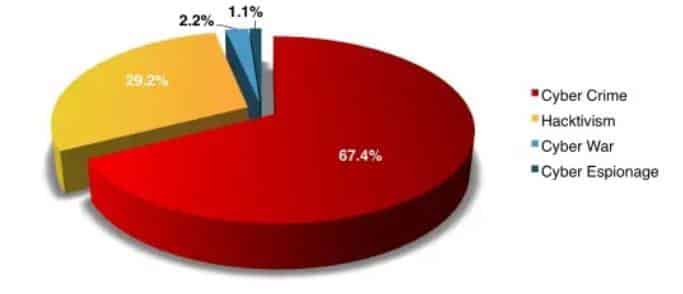
 Motivations behind an attack 

Cyber Attack Motivation

 What data should you seek as an investigator? 

After an occurrence of cyber-attack, collecting all relevant evidence is of utmost significance in responding appropriately to the questions which were outlined above. A forensic examiner or investigator is primarily concerned with a specific piece of evidence, which is known as “latent data.” 

Latent data is also known as ambient data. In the cybersecurity world, ambient data is a type of data that is not easily accessible or visible at first glance at the scene of a Cyber-attack. In simple terms, latent data requires an extra mile from a security expert for it to be accessed as significant evidence. An expert has to engage themselves in much more in-depth investigations to unearth this type of data. Ambient data has many uses to it, and it is equally important just like other types of data except that it is implemented such that access to it has been minimal. 

Examples of ambient data include the following; 

  1. Information that cannot be readily viewed by the commonly used software applications
  2. Information or data that cannot be readily read by the operating system in place. 
  3. The information which is present in computer storage but not readily referenced in the file allocation tables
  4. Previously deleted data stored in:
    • Swap files
    • Memory dumps
    • Blank folders in the hard drive
    • Print spooler files
    • Slack space between the existing files and the temporary cache. 

 Importance of computer forensics 

To a business or corporation, in-depth forensics is paramount. For instance, there is a misleading assumption that implementing defense with routers, firewalls, antiviruses, etc. is sufficient and reliable enough to thwart off any cyber-attack. With the highly versatile technology which is subject to rapid advancements, a security professional should be aware that planting only firewalls as their defense line cannot prevent hackers from accessing their system. 

From a computer forensics point of view, the assumption is untrue since measures such as firewalls only give a scratch of the needed information in case of an attack. These specialized pieces of software can only provide information to a certain degree. Such a mechanism does not possess the deeper layer of data required to provide clues on what happened. To source these specific details, an organization is forced to implement security mechanisms along with the software mentioned above. Deploying this type of security model is known as “Defense in Depth.” 

In systems where defense in depth model is applied, there is a higher possibility that the data presented in case of an attack can be readily admissible in a court of law. After this, the perpetrators who launched the attack can face justice. 

Also, an enterprise or corporation can meet the legal requirements such as HIPPA by incorporating the tenets of a defense in depth. Federal mandates and legislations require that every type of data is stored and archived appropriately for auditing. An entity can suffer severe financial penalties for failing to meet the compliance measures put in place. 

 Computer Forensics Process 

While conducting forensics, it is vital to maintain a chain of custody of the evidence and latent data throughout the investigation. Therefore, take note that the steps outlined below are only general guidelines on how to conduct computer forensics in case of an attack. The specific sequencing of activities can vary depending on the nature of the threat. It is recommended to implement a dynamic method for forensic as each cyber-attack is unique. 

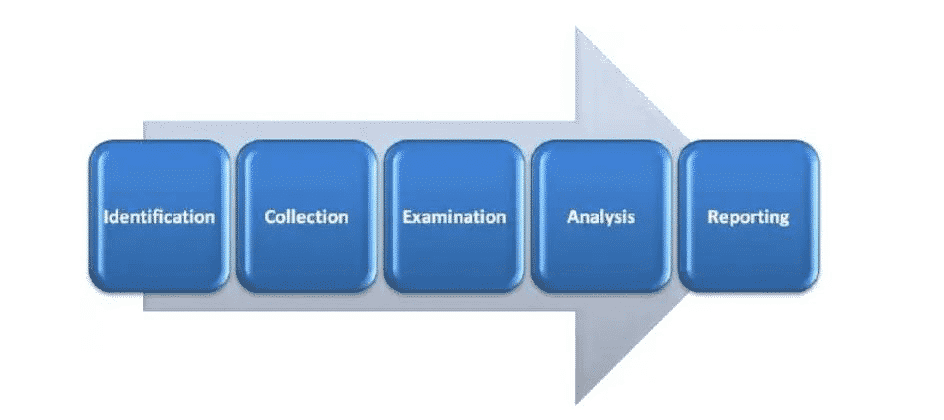
Work procedure can be sub-dived into five major categories:

Computer Forensics Steps

Identification 

This initial step in computer forensics is to understand and identify the scenario. This is where the investigator points out the specific reason for conducting forensic analysis. The investigator also identifies the nature of the incident, the parties involved, and the resources required to satisfy the needs of the case. 

Collection 

The collection of data is the most critical step in this chain of custody because the entire analysis is primarily dependent on the collected data as evidence from the crime scene. Collection is defined as the process of data acquisition while maintaining the transparency or integrity of the data. 

Timely execution of the collection process is key to maintaining the integrity and confidentiality of the data collected. This is because essential data such as latent data may get lost if not acted upon promptly. 

Evidence 

In this third step, the collected data is examined by following standard techniques, methodologies, tools, and procedures to extract meaningful information related to the case.

Analysis 

Since all the five steps are linked, analysis is the step where data analysis of the examined data is conducted. The investigator has the task of finding any evidence against the suspect. The techniques and tools should be legally justified as it helps to create and present the report to a court of law. 

Reporting 

This is the final and perhaps the most critical step. Here, the investigator is expected to logically document the process used to collect, examine, and analyze data. It also entails how the tools and procedures were selected. The primary aim of this step is to report and present the findings justified by the evidence. 

The above five steps can be subdivided into several smaller parts, where every subcategory has standard operating procedures that are specific to them. 

 Computer Forensics Team 

The Forensics Team is expected to follow a given structure while executing their documentation process. The contents of their documents are required to be preserved, verified, and appropriately documented. A forensic team must have in-depth know-how of every investigation. This should be right from the beginning of the project and should cut through the scope, dimensions, and the various methods used for the investigation process. The methods used should be proper and legal such as the legal obtaining and collection of proper bit-stream “hash encrypted” copies of evidence. The linear nature of investigation should be primarily based on proper documentation and concrete supporting evidence to avoid unexpected results that technology might yield.

In addition to law enforcement and security firms, every organization should develop the capacity to solve their basic issues and investigations internally. In the case where it is not possible to form a competent investigative team within the organization, then you can hire experts from small computer investigation firms to aid with investigations. An organization can also create their own investigative firm to supply computer forensic services. To do so, the following key people form part of your investigation team.

Investigators 

This is a group of individuals who tackle and solve the case. The size or number depends entirely on the size of the firm. They are mandated with the task to apply techniques and use relevant techniques to find tangible evidence against the suspected intruder. They can work parallel with law enforcement agencies as they are expected to act promptly upon the occurrence of a suspicious activity, which may lead to an attack. 

Photographer 

He or she is vital for recording events as they unfold during the investigations. Their job is to take photographs. 

Incident Handlers or the first respondents 

The primary role of incident handlers is to monitor and act upon the occurrence of any computer security incidence. They check for malicious activities such as those related to breaching network policy, hijacking of server, RAT, installation of malicious codes or injection of code. 

IT engineers and technicians

This group is responsible for the day-to-day operation of the firm. They are technicians and engineers to manage the forensics lab. It should consist of IT support, desktop support personnel, network administrator, and security engineers. 

The key roles of this personnel are to ensure flawless operation of organizational functions, maintain the required back up, troubleshoot for any problem, and continuously monitor the system. 

Attorney

The whole essence of carrying out the investigations is to document and finally report the issue to a court of law, implying that the presence of an attorney as part of your firm is mandatory. 

 Computer forensics rules 

Below is a list of some of the rules that should be kept in mind while conducting an investigation. 

     1. Eliminate every possibility of investigating the original evidence

Produce several exact copies of the initially collected evidence to reduce the chances of examining the original. Create duplicates; this is the first and the most fundamental of all the rules and should be prioritized first before carrying out any further investigations. Make the exact copies of the original to maintain the integrity of the outcome. 

     2. Only proceed if it is within your knowledge. 

In the case where you stumble on a roadblock while conducting investigations, only proceed if you can understand the solution from your knowledge or experience. You can consult from other experienced guides to get help with that particular issue. This is to protect data from any damage. Do not take the task as a challenge, but rather as an opportunity to learn and enhance your expertise level. 

     3. Stick to boundaries and rules of evidence 

The rule of evidence must be adhered to for the given data to be valid as evidence in court. 

     1. Document 

Record the behavior and any changes that may occur to the evidence. An investigator is expected to document the result, nature, and the reasons why the transition occurred with the evidence. For instance, rebooting a machine may lead to alterations in its temporary files, and an investigator should note this. 

     2. Abide with the legal authorities 

Before the onset of any investigation activity, ensure that you acquire written permission on the details and scope of your investigation. During the investigation, several duplicates and copies must be produced, and without an official or legally written permission, then this would be termed as a breach of IT security policy

     3. Prepare to testify

After completing the documentation, the evidence is taken to court. You should make yourself prepared to testify in court so as not to lose the case. 

     4. Use a traceable path

Your method should be trackable. Avoid trial and error methods. Trial and error methods are not convincible. Ensure to note down each step and be consistent in your actions. 

     5. Be efficient

Be efficient in minimizing the chances of data loss. Some data, such as latent data, are highly volatile and may quickly disappear if not collected in time. Artificial intelligence can be used to speed up the process but do not end up in a rush situation. The human workforce should increase as necessary. And as a rule, always start with volatile data as you collect evidence. 

     6. Do not quit before collecting evidence

Investigations cannot proceed without data to use as evidence. Hence you should not shut down the system before collecting all the evidence. Also, shutdown or rebooting of the system leads to loss of volatile data, so avoid this at all costs.

     7. No running programs on the attacked system 

Running a different program may trigger another program or activity within the system, which may lead to unbearable consequences. 

 Types of evidence 

Evidence is the primary support for a claim in court. It can be classified using many types of different characteristics. Below is a look into some of the four major types of evidence; 

     1. Real/tangible evidence: As the name suggests, real evidence consists of tangible/physical material e.g., hard-drive, flash drive, etc. Apart from the material, a human also might be real evidence, e.g. an eye witness. 


     2. Original evidence:  This is the evidence of a statement made by a person other than the testifying witness. It is offered to prove that the statement was made rather than to prove its truth. This is generally an out of court statement.


     3. Hearsay evidence: It is also referred to as out of court statement. It is made in court, to prove the truth of the matter declared. 


     4. Testimony: When a witness takes oath in a court and give his/her statement in front of the court. Evidence should be admissible, accurate, and authentic; otherwise, it can be challenged while presenting the case in the court. 

 Conclusion 

This is the end of this mini-course, but certainly not the end of knowledge and skills. Technology is rapidly changing with time. With the presence of several storage media, it is an individual, organization, or institution’s effort to understand the media so as investigate whenever needed. While conducting forensics, maintain the highest level of integrity at every stage as much as possible as it is crucial for the success of the investigations. 

19 Social Media Security Best Practices

Social Media Security has quickly become one of the most important issues facing business and individuals. Unlike a few years ago, social networking has asserted itself as one of the primary means for communication. Large corporations and individual users alike prefer the channel for various reasons. The most common ones are the ability to communicate with millions of users at a go, connecting to people from any part of the world, and facilitating the sharing of all types of media. Such include pictures, videos, text messages, and voice and video calls.

Despite its popularity, social media poses security risks due to the rising number of hackers and sophistication of attacks. Security threats are rife, and as such, social media users need to be aware of the best practices required to secure their social media accounts.

Common security risks affecting social media

Third-party applications

Social media companies are aware of the cybersecurity risks they face. They, therefore, frequently assess their systems and applications for vulnerabilities and implements the best measures for enhancing their security. Due to this, cybercriminals use third-party apps to hack their victims. This is demonstrated by Twitters’ security breach, where attackers exploited a security flaw in Twitter Counter (an application used to analyze Twitter activities). They were able to hack the Twitter accounts of Amnesty International and Forbes.[1]

Malware attacks

Cyber adversaries are persistent in their efforts to create smart and stealth malware programs. They use malicious scripts to hack the social media accounts of unsuspecting victims. By tricking their targets into installing the malware, attackers can easily monitor their activities. The approach allows them to access sensitive information like usernames and passwords.

Unsecured mobile devices

The majority of social media users install applications, such as Facebook and Instagram, in their devices for quick and easier access. Besides, smartphones are easily portable, and this makes them useful for social media usage. If a mobile device connected to social media accounts falls in the wrong hands, it can easily compromise a user’s privacy or security, resulting in identity theft, where malicious individuals use compromised accounts to promote their gains.

Imposters

Internet con artists are excellent at creating imposter accounts. Current technology makes it easy to create a replica social media account. To lower suspicion, they can wait for long periods, monitoring the original accounts to ensure they have similar activity history. As a result, targeted users can fall prey and provide highly sensitive information. Rival businesses can use the same tactic to tarnish the name and reputation of their competitors. Also, hackers can use imposter accounts to gain access to social media accounts used for corporate activities.

Unattended accounts

In some cases, individual users or companies create social media accounts and stop monitoring them after using them for a while. Cyber attackers target such accounts since they are aware that no one is watching them. They do not even need to hack them as they can use an imposter account to post fraudulent messages. Unmonitored accounts are a huge risk since they can enable hackers to disseminate false information or send malicious links to followers.

Staying secure

There are many other types of social media security threats. Although the parent companies invest heavily in maintaining secure systems and social media applications, users also have a massive responsibility to keep their social media accounts safe. Here are the top tips for enhancing social media security.

Social Media Security Tips for individual users

1. Monitor your inbox

For many years, hackers have used email messages to conduct phishing attacks. These are attacks where a cyber adversary uses different techniques to trick victims into installing malware or divulging confidential information. The methods can include appealing to the victim’s interests. Social media has, however, made it easier for hackers to carry out phishing campaigns. At a single glance at the user’s profile and account activities, they can create convincing messages to trick victims into clicking a malicious link or downloading an attachment with malware. Therefore, monitor the messages, links, or attachments sent to the inbox. Phishing attacks are usually sent by unknown people and will mostly request for personal information.

2. Utilize password protection

When creating any social media account, the process includes a requirement to create a unique username and password. Password protection is, in fact, one of the easiest ways of keeping a social media account secure. All social media platforms require users to provide a password to gain access. Creating a unique password is nevertheless different from maintaining best password security practices. Recommended practices for enhancing password security consist of creating strong passwords. Strong passwords can prevent a brute-force attack attempt. Also, periodically changing a password can minimize the possibility of its compromise. Furthermore, it is always essential to log out of a social media account once accessed through another person’s device. Most browsers or applications retain passwords where anyone can sign in.

3. Use multi-factor authentication

Many social media platforms support two-factor or multi-factor authentication schemes. They provide additional security to password protection. Enabling multi-factor authentication requires a user to provide a correct password and a second item to verify authenticity. For example, two-factor authentication may send a code to the provided phone number or email address when signing in. Failing to give the sent code, even with a correct password, denies access. Since only the legitimate account owners can access the authentication items, a malicious user can’t gain access. However, not all social media platforms enable multi-factor authentication in their default security settings. The account owner must hence allow the option in the privacy and security settings. Applying multi-factor authentication is an effective way of enhancing social media security and preventing unauthorized individuals from accessing the account.

4. Set up hard to guess security answers

When creating a social media account like Facebook, users must provide the phone number or email address for resetting passwords, in case they forget. Malicious individuals may have access to the email accounts or phone numbers and use them to rest the passwords. As such, they can sign in as the real owner and use the account to post harmful content or target followers with phishing messages. Using security answers can enhance social media security since resetting passwords might require one to provide answers to the security questions. Providing the wrong answer prevents a password reset, and this strengthens social media security. However, just like multi-factor authentication, the security questions to be used during password reset must be enabled in the security and privacy settings.

5. Manage the privacy settings

As previously stated, social media users have a huge responsibility in ensuring their personal security and that of their accounts. Due to this, they should proactively manage their privacy settings to determine who can see their posts or timeline activities. Maintaining privacy settings protects a user from social media phishers. To create a successful phishing message, an attacker must identify the interests of the target. Enabling privacy settings such as followers or friends can view the timeline history can prevent phishing attacks, thus enhancing social media security.

In that light, it is also advisable to be careful with the messages a user posts on social media. The primary intent of hackers is to access personal information such as social security numbers, credit card numbers, home addresses, and user passwords. Posting such information on a public platform like Facebook only simplifies a cyber adversary’s work. The more a user posts personal information on social media, the easier it is for a hacker to steal the user’s identity.

6. Secure mobile devices and computer

Sometimes, all a cyber actor requires to compromise social media security is a vulnerable computer. Cybercriminals exploit computer or mobile device vulnerabilities to install malware programs. Through the malware, a hacker can remotely monitor all activities, including the social media usage patterns of a particular victim. This can provide a cybercriminal with the necessary information for accessing the victim’s social media accounts.

There are multiple measures one can implement to ensure computer and mobile devices security. Using antivirus solutions can detect malware programs present on the computer. Also, acquiring updates whenever they become available, especially for social media applications, installs the latest security updates. As a result, it becomes difficult for a cybercriminal to exploit security vulnerabilities.

7. Who are your followers and friends on social media?

Verifying requests sent by new friends or followers can go a long way in enhancing social media security. The main aim of social media is to connect people from different parts of the world. As a result, hackers utilize such opportunities to create fake social media profiles and sending requests to hundreds of users as it increases the possibility of finding an easy target. It is prudent to verify the social media profile to determine its authenticity. It is relatively easy since a legitimate profile should contain a history of the owner’s activities. Such include sharing photos and comments on their posts from other friends. A profile with hard to verify information can be a cybercriminal using a fake account. Delete such requests and take the extra step of blocking or reporting them for further investigations.

Social Media Security Tips for Businesses

Businesses are heavy users of social media. They use different sites like Facebook, Instagram, and Twitter, to advertise products and interact with customers. The heavy usage is due to the various advantages, which include responding to user queries in real-time, promoting products in different parts of the globe, and maintaining business image and reputation. Since social media acts as the face of an organization, companies must ensure their social media accounts are secure. The following are the top social media security tips businesses can use.

1. Perform frequent audits

Due to emerging technology and hacking tactics, the threats impacting social media security change constantly. Cybercriminals are always devising new strategies, viruses, or scams that they can use to compromise social media accounts which businesses operate. Therefore, a company aiming to keep ahead of cyber actors should enforce regular audits of all implemented security measures. A quarterly or semi-annual audit is sufficient, and a review on the following should guide a comprehensive inspection:

2. Social media policy

Businesses enforce social media policies uniquely tailored to meet their communication needs. As such, the businesses should review the policies to accommodate changes in social media usage and security practices. A frequent review can ensure that social media security documentations remain useful in securing their accounts.

3. Publishing and access privileges

Auditing publishing and access permissions can enable an organization to protect its social media accounts. Permissions review is necessary since it identifies users with the rights to publish content on the platforms. Some users might have changed their roles or had their access revoked. As such, auditing ensures that only users with the necessary permissions can access or publish on social media.

4. Privacy settings

Social media sites tend to update their respective privacy settings. The updates can impact the security of an account since it will be using the old privacy settings before they were updated. Businesses should ensure that they frequently audit their security settings to ensure they are in tandem with the new updates.

5. Keep track of recent threats

The IT department of any company should track new risks and working solutions. Tracking emerging threats enables a business to implement sufficient measures for responding to them or preventing them entirely.

6.Implement a system for approving new posts

All businesses dread any incidence that can damage their reputation. A malicious individual with the correct login information can access the account and post information that can ruin the company’s reputation. Notwithstanding, an employee with good intentions can use the same platform to post sensitive business information about the business. Such information can include unreleased products or services that have not yet been unveiled. Moreover, a user can also use a work social media account to post personal information. Whereas this does not pose any significant risk to the account’s security, it demonstrates a business’s inability to control information flow, thus affecting its reputation and customer base.

Every organization should, therefore, implement a system that it can use to approve any posted information. Such information can include designating a group of individuals who approve different types of information. For example, an employee from the marketing and finance departments can approve any information originating from their respective sections. In a recent case, a marketing contractor working for Z-Burger posted a graphic image of a killed journalist on the company’s Twitter handle[2]. The contractor had publishing rights, but the company lacked a system for approving new posts.

7. Monitor all social media accounts

As mentioned earlier, unmonitored accounts are one of the biggest threats to social media security. Hackers target unattended accounts since they are easy to hack or impersonate. Monitoring all social media channels is hence a security necessity that a company should consider observing. Monitoring should include accounts used every day, and those that were opened but used for a short while or not used at all. As a result, it can be possible to detect any cyber actor who manages to hack and use the accounts. However, monitoring the accounts usage patterns alone is not enough. It is also vital to monitor the originality and authenticity of all posted information. To achieve this, a business can cross-reference its posts with the company’s content calendar.

Besides, following up on everything can enable a business to maintain sufficient social media security. Social media platforms are designed such that any information communicated through them appears to be from the owner or authorized users. However, this is not always the case. Digging into all activities, even those that look legitimate can uncover risks that can cause security issues in social media usage and access. Some content can be crafted to stray from the intended information. This can be due to human error, or due to unauthorized access. Also, monitoring should include watching out for employees who make inappropriate comments or mentions about the business’s brand, negative conversations regarding the business, and imposter accounts.

8. Designate a social media officer

Creating a role that establishes the position of an employee responsible for controlling social media accounts can enhance their security. It can also bolster the efforts put in place for mitigating risks and threats. The person who fills such a role should be responsible for developing and owning social media security policies. Other vital roles can include monitoring the company’s social media presence and determining individuals with permissions to access or post on the accounts. This is particularly important since unauthorized posts or access can compromise the security and integrity of the account in question.

To ensure the employees responsible for securing an organization’s social media accounts discharges the role effectively, they require to collaborate with the IT department. A good relationship will be valuable in facilitating sufficient risk mitigation and prevention. Also, the social media officer needs to closely work with all departments that require the accounts to fulfill their obligations. Such may include marketing. As a result, the officer can approve or decline to authorize posts depending on how they impact the organization’s strategies, objectives, or regulations.

9. Restrict the use of social media

According to a survey done by PriceWaterhouseCoopers, organizational employees have higher possibilities of causing social media security risks compared to hackers. Employees can make errors when posting on a business’s timeline, which can result in security risks. As a result, restricting the use of social media is one of the best ways of keeping the company’s social media accounts secure. For example, a business may task different teams with roles such as messaging customers through social media, creating new posts, or providing customer services. However, not everyone requires the permissions to post; neither should all team members have access to login passwords.

As such, minimizing the number of employees capable of posting should be a top priority in managing social media security. Once a business identifies employees with permissions for posting, it should consider using software solutions that can provide direct access without requiring a password or username. This would eliminate the need for continually changing login credentials once an employee leaves the business or the permissions are revoked.

10. Train best social media security practices

Adopting the most potent social media security policies can be useless if the employees are ignorant of best usage practices. Whereas such a policy needs to be simple and easy to understand, training staff provides them with an opportunity of actually learning how to enforce it. Training sessions also enable staff to understand social media security threats and their responsibilities in preventing them. Moreover, training sessions provide a business with the time to review implemented policies and updating them accordingly.

11. Maintain social media policy

Any business using or planning to use social media must develop a comprehensive policy to ensure its security. An effective policy should contain guidelines for preventing negative PR or legal struggles, and more importantly, mitigating security threats. Some of the guidelines to include in the policy are:

  1. The team members or departments with access to company social media accounts
  2. Guidelines for working password management strategies
  3. How employees can identify social media threats, attacks, scams, and how to report them
  4. Rules governing the use of personal social media for work reasons
  5. Guidelines for talking about the business’s brand on social media
  6. Invest in automated security technologies

Monitoring social media activities using human operators can be challenging since they can make errors or be unable to ensure round the clock monitoring. Subsequently, some threats can go unnoticed, resulting in disastrous security breaches. An automated solution can prevent that from happening since it doesn’t make errors, nor will it leave the system unmonitored. Automated security monitoring can alert of offensive posts that can harm a business’s reputation. Also, it can detect links or attachments used for phishing campaigns, fraudulent accounts attempting to impersonate a company or scams that target the business’ customers. As a result, a business can enjoy enhanced social media security.

  1. https://techcrunch.com/2017/03/15/twitter-counter-hacked/
  2. https://www.washingtonpost.com/news/local/wp/2018/07/25/z-burger-hamburger-chain-apologizes-over-callous-misuse-of-images-in-twitter-ad/?noredirect=on&utm_term=.4db4fd615913


Cyber Threat Analysis – A Complete Guide

Cyber threat analysis is the process of assessing the cyber activities and capabilities of unknown intelligence entities or criminals. A cybersecurity threat or “cyber threat” can be defined as a malicious act that seeks to disrupt digital life.  This act could be the disruption of a communication pathway, the damage of data, or stealing data.

Hackers target enterprises, governments, institutions, or even individuals with valuable information. Threats posed by cyber-attacks include denial of service attacks (DoS), computer viruses, malware, phishing emails, and others. The attacks target anyone with an online presence.  Cyber-attacks can lead to electrical blackouts, breaches of government security details, failure of military equipment, disruption of computer networks, paralyzation of phone networks, unavailability of confidential data and it may affect the functioning of human life.

Cyber-threats increase day-after-day as the technological advancement in artificial intelligence or intelligent systems facilitate the need for better skills to by-pass highly secure systems. For these reasons, organization leaders must complete a thorough and detailed cyber threat analysis to know the extent of exposure of their business or enterprises to cyber-attacks.

The main objective of cyber threat analysis is to produce findings used to aid in initialization or support of counter-intelligence investigations. Then action is taken to eliminate the threat from the given organizations, business, or government system. In cyber threat analysis, the know-how on external and internal information vulnerabilities relating to a particular business model is matched against the actual or real-world cyber-attacks. This type of approach to countering cyber-attack is a desirable transition from a reactive security state to an efficient, proactive state.

The final output from a threat assessment should provide the best practices on how to utilize the protective controls to promote integrity, availability, and confidentiality, without affecting the functionality and usability conditions.

Components of the Cyber Threat Analysis Process

Components of Cyber Threat Analysis

1. Scope

The scope of the cyber threat analysis states what will be included and excluded from the analysis. Included items are those items that should be protected from the threat.

The first step in any cyber threat analysis should be to identify every susceptible item that must be protected from access by malicious third parties. After this, the level of sensitivity and the desired degree of protection of the item is drafted and extensively defined by the analysis drafters.

2. Collection of Data

In every well-structured organization, there are procedures and policies to guide how people, machines and other components of an organization are expected to operate. All these need to be clearly stated out for compliance purposes.

In reality, close to 25% of organizations fail to meet the minimum security standards put in place. The Senior VP of Hewlett Packard, Art Gilland, stated that most organizations fail to meet the required security standards because they are in a rush to meet a policy. Organizations tend to “check boxes” for compliance instead of implementing protective measures to the levels defined by the scope of the threat and the exposed item.

In the Collection of Data stage, the first step is to collect information about the actual cyber-attack or threat incidents. Examples could be phishing email header and content, uncovered hostile command and control infrastructure of IP addresses and domain names, URLs to malicious links, and so on. One must distinguish between real potential attacks and threats that are not real but are perceived threats. The scope should help filter out percieved threats in order to ensure that the focus is on the targeted threats that exist in reality.

In order, to transform data into intelligence, an information technology analyst must be granted unrestricted system access. Research can be sourced from many places including internet searches, intrusion incidents, firewall logs, digital forensic analysis, reverse engineering of malware, digital forensic analysis, detection system logs, honeypots etc.

Corporate procedures and policies should be analyzed and a thorough investigation should be done to determine whether they meet the compliance standards or level in the organization.

3. Vulnerability Analysis of Acceptable Risks

In this phase, the analysts test what has already been gathered in order to determine the extent of current exposure. The existing security defense is tested to determine whether it has the capability to neutralize information threats in terms of integrity, availability and confidentiality. This stage should double check whether the current policies, security measures and policies are adequate protective measures. Penetration tests are also done as part of vulnerability analysis in an attempt to identify vunerabillites.

Fig. 2

When a cyber-attack encircles the rings of protection

Circles of Protection - Cyber Threats

Threat analysis is a continuous process and not an occasional or a one-time event. It is an ongoing process that  ensure that all safeguards work properly. Risk evaluation should be incorporated as an integral part of an organization so that it becomes part of the overall life cycle. This helps in identifying risks that might have not yet reached their full blown stage, where they cause maximum damage and loss to the organization.

4. Mitigation and Anticipation

After completion of all other previous steps, a highly qualified analyst can then use the corpus of threat data identified to determine preventive measures. The analyst has the task to catigorize the threat data into groups, allocate each pattern to specific threat actors, and implement mitigation measures. Subsiquently, the analyst must anticipate the occurrence of similar attack in the future.


Methodology

Threat models and metrics included in this section are meant to aid in characterization of specific threats hence fulfilling the elementary purpose of threat analysis.

1. Threat Metrics

Understanding how anomalies and trends occur can be used to facilitate the threat analysis process when an accurate measurement of events is done. It can also underline the ability of certain type of threats. This is done by joining the missing dots between the experienced threats and the possible consequences. In short, qualitative threat measurement techniques and process should give precise results concerning risk management. Defining and applying threat measures of acceptable quality is a practice that does not have maturity and consistency in its nature of execution.

Metric can be defined as a unit of measure. On the other hand, measure is a definition for a given hallmark of performance. For instance, if a threat is perfectly measured in a consistent way, with the help of a good metric that is clear and unambiguous as well, then the analysist is most likely to upgrade his ability to understand that threat, affect, control and defend against it for a given period of time. Decision making as per the correct interpolation is much simpler if the nebulosity is not extremely dark.

An ideal example of an appropriate quantitative portrayal in cyberspace is the number of intrusions or attacks per month. When these figures are taken for a long stretch of time, they can reveal the capability and intent of the adversary. This gives an analyst the task to properly calculate all the possible risks and further allocate resources required to sort it out.

2. Threat Models

A threat model is basically a well-organized representation of all the necessary information that affects the security of a system, application or network server. This can be simply termed as the view of an information technology via a security glass. capturing, organizing and analyzing all the gathered information in an understandable and logical order is known as threat modelling. To do this sufficiently, a combination of metrics known as measurement framework is preferred instead of a stand-alone metric. This is because of the incapability of the latter to encapsulate behavioral characteristics of the complex actors or systems.

In addition to the definition given at the beginning, a threat can be considered as a malevolent actor with specific personal, political or social goal intended to oppose an accepted social norm, a private enterprise or an established government. The actor in this case is can be an organization, institution or an individual with self-centered interests to satisfy. A model on the hand, is a simplified representation of something. Therefore, a threat model is a combination of the two definitions, in that, it gives prominence to details relevant to the threat.

Using consistent threat model in threat analysis promotes consistency as well as reduce the detrimental effects of personal bias and preconceived opinions and notion. As time goes by, data acquired continues to pile up while index of success rate also intensifies. Due to such reasons, inter alia is strongly advised to keep clear a trackable record of data stored in a continuous manner. Properly documented data acts as reference database that can in turn be used by other cyber-security experts.

Threat Modeling Process

Sample No. 1

Risk assessment and threat modelling process takes place in three major steps:

  1. Assess risk – determine the amount you are to lose from the assessment
  2. Determine potential threats – state out various things that your system does that can possibly be attacked including what libraries and frameworks do for you.
  3. Mitigate threats – make sure that the parts of your code that are susceptible to attack are well protected.

Threat Modelling Process

Sample No. 2

Below is an overview of the threat modeling process

  1. Identify assets – point out each and every asset that must be protected.
  2. Come up with an architecture overview – use tables and relatively simple diagrams to document the architecture of your system. Other components to be included include trust boundaries, data flow and subsystems.
  3. Breakdown the application – breakdown the architecture of your application including the underlying host infrastructure design so as to come up with a security profile for the system. The primary objective creating a security profile is to uncover each and every vulnerability in the system’s design, configuration or implementation.
  4. Identify the risk – having the attackers goal in mind as well as know-how on the architecture and potential vulnerabilities of your system, distinctively identify the risks that could definitely affect the system or application.
  5. Logically document the threats in an organized manner – use a common threat template to capture the attributes specific to each and every threat.
  6. Rate the threat – arrange the threats in order of the potential damage that they are capable of causing to the system such that the most significant threats come first.

The Generic Threat Matrix

In this method, an analyst uses necessary threat attributes to characterize the type of risk based on the overall nature of the threat. By using this kind of characterization, an analyst is able to fully describe the threats without conforming to the preconceived notion. To get this better, we can define matrix as a framework or a model used to organize a set of other related metrics into the desired structure. The matrix is graduated into levels of magnitude where, each level corresponds to a unique threat.

1. Threat Attributes

Threat attribute is an independent feature of a threat and are of two dominant groups;

Commitment Attribute Group

A commitment is a pledge that confines an individual to some course of action. Applying the same, attributes in commitment group are attested to the unconditional willingness of the threat to attain its specific goal. For a higher level of commitment, the threats virtually stop at no obstacle to achieve their aim. Attributes are classified into 3 groups:

  • Stealth (Question: Does the organization have any verified information concerning the threat?)
  • Time (Question: how much time is the threat willing to invest?)
  • Intensity (Question: To what extent is the threat willing to go?)

Resource Attribute Group

The attributes in this category shows the amount of resources that a threat can deploy. Unlike in commitment attribute group, here, a higher value of magnitude denotes that the threat is more sophisticated hence it can easily attain its goal easily.

Resource family is also made up of three attributes:

  • Access (Question: How efficient is the ability of the threat actor to compromise the system?)
  • Technical Personnel (Question: How many individuals is the threat using to further its ends?)
  • Knowledge (Question: What level of skill drives the threat engine?)

Threat Matrix

Threat Matrix

2. Attack Vectors

This is the path or route used by a threat to gain access to a system, network or a device, primarily, to launch a cyber-attack, plant a malware, gather relevant information, etc. Attack vectors are as follows:

  • Mobile devices
  • Unsecured wireless networks
  • Phishing attacks
  • Removable media
  • Malicious web content
  • Malware and viruses

3. Target Characteristics

The rate at which targets are hit by threats vary because some are more vulnerable and attractive than others. The frequency of attack on a target is also a significant information to be expressed in metrics.

4. Attack Trees

Attack trees concept is a structured and hierarchical way to logically collect and document the anticipated or likely attacks on a given system. The tree decomposes the threat agents depending on the type of attack each agent utilizes.

Fig 3

Creating attack trees

Pros of attack trees

  1. It provides a direct and transparent mode for analysis of attack agents
  2. The model encourages the use of deductions or conclusions which can be harnessed for quality output.
  3. They are highly flexible, hence can cover the entire spectrum of threats and attack agents in the entire platform.
  4. It is compatible with other models and data from attack trees can be used in analysis using a different model.
  5. Attack Frequency

This is an indicatory metric that can be used in conjunction to data corresponding to the degree of an attack. The idea of pairing vulnerability index and frequency metric can also be considered while using attack tree model for threat analysis.

Cyber Threat Analysis Position

The Threat Analyst Position and Assessment Abilities

A threat analyst is responsible for the determination of the level of risk within their organization based on both risk and vulnerability assessment. The threat analyst defines what security measures need to be enforced and which ones are ineffective and should be discarded. The measures should not be exaggerated as this may lead to overprotective controls that result in higher initial installation cost and unecessarily high maintenance costs.

Threats and the nature of attacks continue to evolve with technological advancement. Millions are spent on inovation and training. Becoming a strong technical expert is the only way to combat the rapidly mutating cyber-attacks. Continuous practice and constant learning using books, blogs, and journals is required master your security skills in information technology. Hard work is required to becoming an elite analyst who can effectively deal with encountered security issues.

The data used in analysis is usually outsourced from intelligent products which require technical skills for interpretation. The threat analyst must possess skills to read and interpret data from security events. The analyst should have technical writing skills to prepare a report of their findings. These capabilities are often less of a science and more of an art.

Conclusion

Cyber threat analysis is a continuous process that should be carried out frequently to ensure that security measures work effectively as per the intention. This is because of the rapidly changing technology and other factors that affect cyberspace such as political factors, social factors and so on and so forth. Organization that do not perform threat and risk analysis are left open to attack by cyber pests which can lead damage of their business forever. In cybersecurity hemisphere, nothing is more detrimental than the feeling of being vulnerable as it leaves you with no option but to trust that your lucky star will magically extend its reach to patch up every loop-hole in the system that threats infiltrate through.